Customer service chatbot: what it is, how it works, and how to choose one in 2026
 14 minutes
 25.06.2026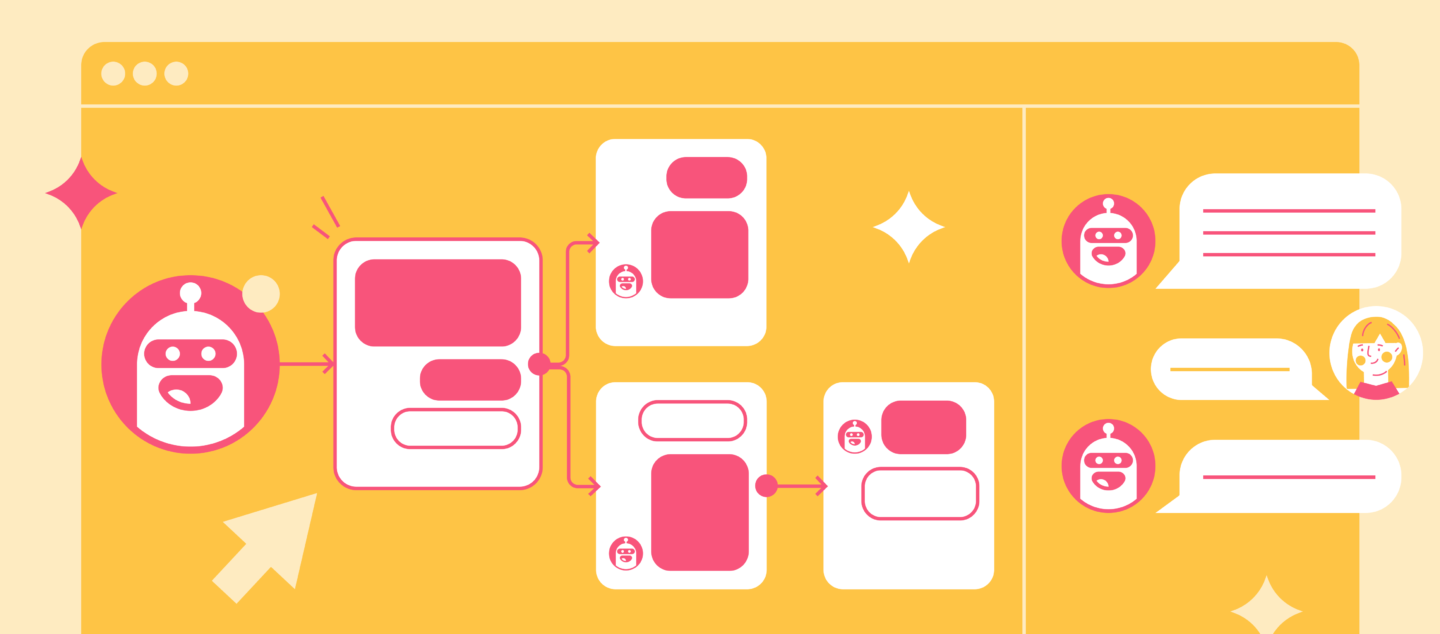
Support teams field the same 20 questions 80% of the time. A customer service chatbot handles that workload automatically, giving agents back hours they’d otherwise spend on password resets and shipping ETAs.
But not all chatbots are equal. A rule-based bot that fails on a typo is a different product from an LLM-powered AI agent that resolves ambiguous queries, escalates intelligently, and improves with every conversation.
For the broader customer service automation space, see our full guide.
What is a customer service chatbot?
A customer service chatbot is software that handles customer inquiries automatically: answering questions, routing requests, and resolving issues without a human agent stepping in.
Three types exist, and the distinction matters before you evaluate any tool.
| Type | How it works | Best for | Limitation |
|---|---|---|---|
| Rule-based | Fixed decision tree, keyword triggers | Simple FAQ, button-click flows | Fails on any input outside the script |
| AI-powered | NLP understands intent, handles varied phrasing | Multi-turn support, ambiguous queries | Responds but cannot take actions |
| Agentic AI | Takes actions in CRM, helpdesk, billing systems | End-to-end resolution, complex workflows | Requires deeper integration setup |
Rule-based chatbots work from a predefined decision tree. They respond to exact keyword matches or button clicks. If a customer types something outside the script, the bot fails. They are cheap to set up but brittle under real-world conditions.
AI-powered chatbots use natural language processing (NLP) to understand intent, not just keywords. They handle varied phrasing, extract meaning from incomplete sentences, and maintain context across a multi-turn conversation.
Agentic AI chatbots go further. They do not just respond: they take actions. Look up order status in your CRM. Update a ticket. Send a follow-up email. Trigger a refund flow. They handle complex, multi-step tasks the same way a trained agent would.
The difference between the three comes down to capability ceiling, not price range. Most of the marketing you read today describes agentic AI; most of the products being sold sit somewhere between rule-based and AI-powered.
A customer service chatbot lives wherever customers reach you: your website widget, in-app messenger, WhatsApp, Telegram, or email. The strongest deployments cover multiple channels from one configuration.
How AI customer service chatbots work
The mechanics behind a modern AI chatbot break into four steps that happen in under a second.
1. Intent detection. The chatbot receives a customer message and classifies what the customer is trying to do: get a refund, reset a password, check delivery status. Modern systems use transformer-based NLP models trained on millions of support conversations, which means they tolerate misspellings, slang, and incomplete sentences.
2. Context management. Unlike rule-based bots that treat every message as isolated, AI chatbots maintain conversation history. They know the customer said “I ordered last week” three messages ago and use that context to generate a relevant response.
3. Response generation. The system retrieves an answer from your knowledge base, live CRM data, or a trained response library, then uses generative AI to produce a contextually relevant reply. LLM-powered bots generate this text dynamically rather than pulling from canned scripts.
4. Escalation logic. When confidence drops below a threshold, when sentiment analysis detects a frustrated customer, or when the customer explicitly asks for a human, the bot routes to a human handoff. The full conversation context transfers, so the agent does not start from zero.
The shift from rule-based scripts to agentic AI means the bot handles ambiguous queries, takes multi-step actions, and learns from failure. Dashly’s AI agent is built on this model, handling support flows end-to-end rather than routing simple FAQ lookups.
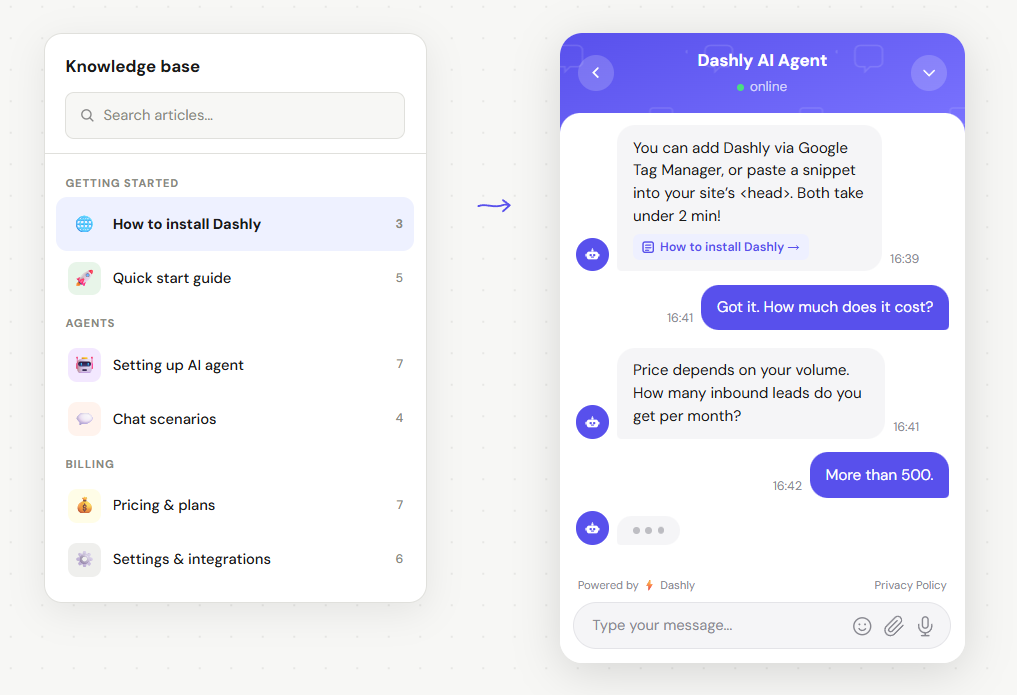
Here’s an example of a conversation with an AI agent:
For broader context on how chatbots fit into customer service automation strategy, see our full guide.
6 reasons to use a chatbot for customer service
The business case for chatbots comes down to three numbers: resolution rate, response time, and cost per ticket. Here is what each looks like in practice.
1. 24/7 availability without headcount. 64% of consumers expect to be able to reach customer service at any time of day (CM.com). Staffing a human team for night shifts across time zones costs far more than a chatbot that never sleeps.
2. High ticket deflection rates. AI chatbots handle 68% of customer conversations without human intervention on average (Tidio, 2024). For B2B SaaS teams where tier-1 support is dominated by billing questions, onboarding FAQs, and feature lookups, deflection above 60% is achievable within the first 90 days, raising first contact resolution rates without adding headcount.
3. Faster first response. Chatbots respond in under a second. For customers mid-session in your product, a multi-minute wait is enough to trigger a drop-off. Speed alone moves CSAT.
Teams that deploy AI agents report saving 360+ agent hours per month within six months of launch (Zendesk customer data, 2023).
4. Lower cost per resolution. Human support costs $7–13 per ticket (Gartner, 2022). Automated resolution via chatbot typically runs $0.25–1.00 per interaction. At 500 tickets per month, the math is immediate. See our breakdown of customer service automation ROI for a full cost model.
5. Consistent quality at scale. A human agent on their 40th ticket of the day answers differently than on their 5th. A chatbot delivers the same quality response on ticket 4,000 as on ticket 1.
6. Multilingual coverage without hiring. LLM-powered chatbots handle 50+ languages without separate configurations. 76% of consumers prefer purchasing products with information in their own language (CSA Research). A chatbot closes that gap without adding headcount.
8 customer service chatbot use cases (with real examples)
The strongest chatbot deployments do not try to automate everything at once. They start with use cases where volume is high and variance is low, then expand.
1. FAQ automation. The most common starting point. A self-service FAQ bot answers password resets, billing cycle questions, and feature documentation requests automatically. HelloSugar deployed an AI bot to handle tier-1 queries and automated 66% of all support interactions, saving $14,000 per month in agent costs (Zendesk, 2023).
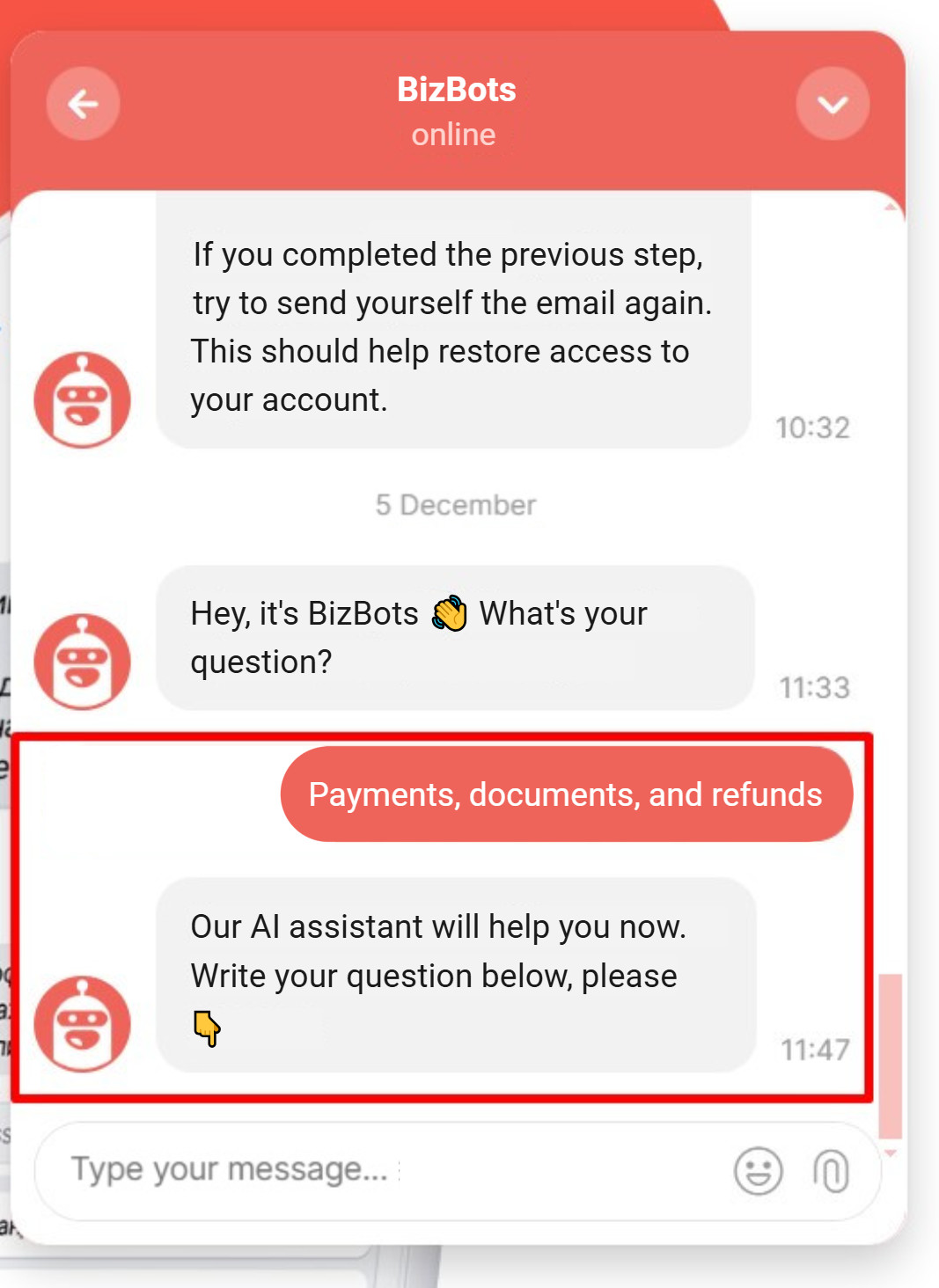
Here’s an AI agent handling specific FAQs related to payments:
2. Onboarding guidance. B2B SaaS customers who do not activate in the first 7 days are significantly more likely to churn before converting to paid. A chatbot that proactively guides users through initial setup reduces time-to-value without scaling the onboarding team. “You have not connected your CRM yet, here is how” is a one-message intervention that moves activation rates.
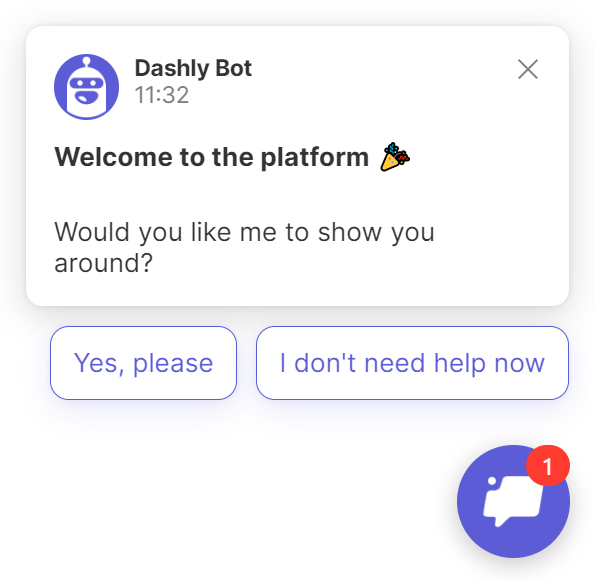
3. Order and account status. For subscription businesses, “When does my trial end?” and “What is included in my plan?” account for a large share of total support volume. A chatbot connected to your billing system resolves both without touching your queue.
4. Escalation routing. Not every chatbot task is resolution. Smart escalation, routing a frustrated enterprise customer directly to their account manager rather than a tier-1 queue, is a use case where chatbots reduce friction without attempting to resolve. The Lush cosmetics team automated escalation routing and saved 360 agent hours per month (Zendesk, 2023).
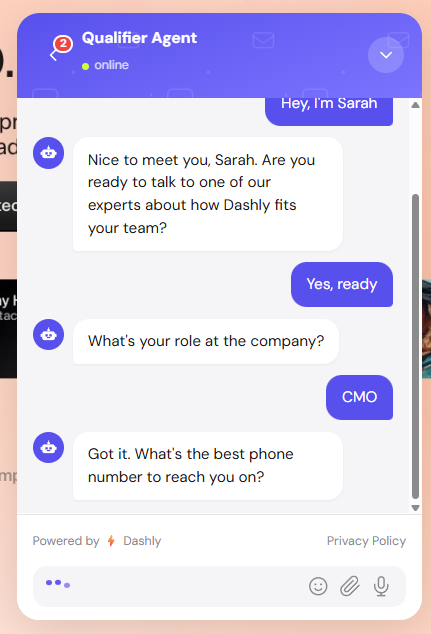
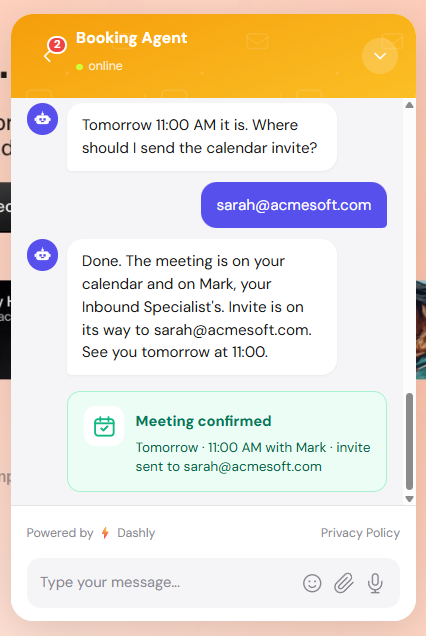
5. Lead qualification. A customer service chatbot on your pricing or features pages drives lead capture by qualifying visitor intent in real time. “Are you evaluating for a team or individual use?” is a two-second chatbot interaction. The same information takes 15 minutes to gather via email.
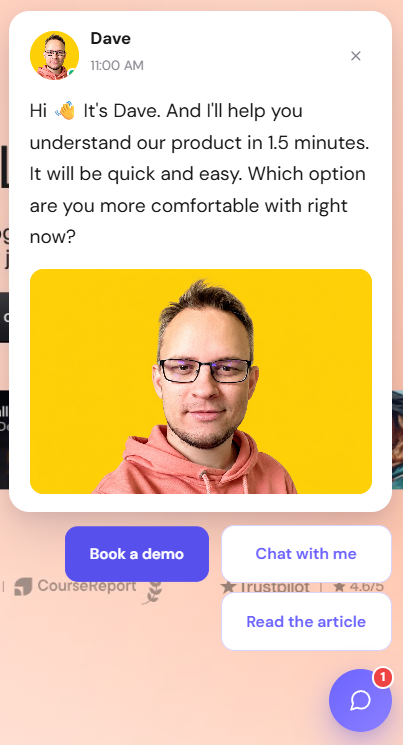
In Dashly case, it’s not a chatbot. It’s a synced team of AI Qualifier and Support agents working together to capture leads and handle their questions:
Step 1: Engagement
Step 2: Qualification
Step 3: Booking
6. Proactive outreach. Instead of waiting for customers to ask, chatbots use proactive messaging triggered by user behavior. A user who visits the cancellation page three times in a week gets an automated message about pause options or usage data. This drives measurable retention when implemented with the right escalation to a human.
7. Multilingual support. A single LLM-powered chatbot covers Spanish, French, and German without separate configurations. Language detection is automatic; the customer experience is native.
8. After-hours triage. Tickets that arrive at 11pm do not wait until morning. They get triaged, categorized, and answered, or escalated to an on-call engineer if severity warrants. When the team arrives in the morning, the overnight queue is already processed.
For a broader view of automated customer service examples across industries, see our roundup with 12 real deployments.
Or talk about your specific case with us 👇
What to look for in a customer service chatbot
Before comparing specific tools, nail down five evaluation criteria. Every vendor will claim to cover all five. Your job is to verify.
NLP quality. Test the bot against your actual support tickets, not demo scripts. Give it ambiguous phrasing, typos, and multi-intent messages (“I want to upgrade but also need a refund for last month”). The resolution rate in controlled demos is always higher than in production. Ask vendors for real-world deflection data from customers in your segment.
CRM and helpdesk integration. A chatbot that cannot read your CRM cannot personalize responses or take action. Verify whether integration is native or requires middleware. Native integrations update in real time; middleware adds latency and failure points.
Handoff protocol. How does the bot transfer to a human agent? Does it pass conversation history, customer context, and the reason for escalation? Or does it drop the customer into a blank queue? Poor handoffs destroy the experience the chatbot built. Test the escalation path before committing to a platform.
Analytics and reporting. You need deflection rate, CSAT by conversation type, and escalation triggers. Without this data, you cannot improve. Platforms that only report conversation volume are telling you how busy the bot is, not how well it is working.
Pricing model. Per-seat pricing makes sense for live chat. For chatbots, it creates the wrong incentives. Look for per-resolution or usage-based pricing. Zendesk, for reference, prices AI resolution at $1.00 per automated resolution (Zendesk, 2024).
Channel coverage. Does the bot deploy to your website, in-app, WhatsApp, and Telegram from one configuration? True omnichannel coverage is a requirement for B2B SaaS with a global customer base, not an add-on.
- For a side-by-side comparison, see our roundup of AI customer support tools with criteria-based scoring.
- For the chatbot category specifically, our customer service chatbots guide covers the leading platforms.
4 customer service chatbot examples from real companies
Each example below is drawn from a publicly available case study or press release. The ROI figures are the company’s own reported outcomes.
HelloSugar (beauty services, US). HelloSugar deployed an AI bot to handle tier-1 inquiries across a franchise network. Result: 66% of all support interactions automated, $14,000 in monthly cost savings, no additional headcount.
Lush Cosmetics (retail, global). Lush implemented AI-powered escalation routing and FAQ handling during peak product launch periods. Result: 360 agent hours saved per month, five minutes average time saved per ticket.
Klarna (fintech, Sweden). Klarna’s AI assistant handled 2.3 million conversations in its first month, the equivalent of 700 full-time human agents. Average resolution time dropped from 11 minutes to 2 minutes, with customer satisfaction scores on par with human agents (Klarna, 2024).
Woebot Health (mental health SaaS, US). Woebot deployed a specialized chatbot for mental health check-ins that handled over 100 million conversation exchanges. The chatbot manages initial triage and daily user engagement, freeing clinical staff for high-acuity cases (Woebot, 2023).
For more real-world deployments across the B2B SaaS context, see our guide on AI in customer service examples.
How to set up a customer service chatbot: 5-step playbook
Most chatbot deployments fail not because the technology does not work, but because setup was rushed. Five steps prevent the most common failure modes.
Step 1: Map your top 20 ticket categories. Pull your last 90 days of support tickets. Group them by type. The top 20 categories typically account for 70–80% of total volume. These are your chatbot’s starting use cases. Ignore edge cases for now; complexity is the enemy of a fast first deployment.
Step 2: Choose a platform matched to your stack. Your chatbot needs to integrate with your CRM, helpdesk, and product data. A generic bot that cannot read user context cannot personalize. Evaluate three to five chatbot platforms against your specific integration requirements. For B2B SaaS teams using a connected messaging platform, Dashly’s AI agent for support connects natively to your product database and CRM, pulling account data and subscription status in real time.
Step 3: Configure and train. Upload your knowledge base, map the conversation flow for your top 20 use cases, and set escalation rules. For AI-powered platforms, provide training examples: conversation samples the model uses to calibrate intent detection. Plan for two to three weeks of configuration before you see production-quality performance.
Step 4: Test escalation flows before launch. The highest-risk failure mode is a chatbot that fails silently: it does not resolve the issue but does not hand off to a human either. Test every escalation trigger. Run 50+ conversations manually. Verify that agent handoff passes full context. This step takes a day; skipping it costs customer trust.
Step 5: Measure and iterate weekly. Track deflection rate, CSAT, and escalation triggers from day one. In the first four weeks, you will find three to five conversation paths that are failing. Fix those before expanding scope. Monthly reviews after that.
For the workflow structure behind this playbook, see our guide on customer service workflows.
Conclusion
A customer service chatbot works when it is treated as an agent, not a FAQ lookup. The teams getting real ROI, 60%+ deflection and 300+ hours saved monthly, are the ones that mapped their highest-volume use cases first, integrated their CRM, and built escalation paths that do not abandon the customer mid-conversation.
The technology has crossed the threshold where a well-configured AI chatbot handles ambiguous queries better than the average tier-1 agent. The gap now is implementation: how thoroughly you train it, how cleanly you integrate it, and how honestly you measure it. Our breakdown of customer service automation ROI models the deflection-to-cost curve with real benchmarks.
If you are evaluating options for a B2B SaaS team, the right starting question is not “which chatbot is best?” It is “which chatbot fits our stack and handles our top 20 ticket types without scripted guardrails?”
FAQ
A customer service chatbot is software that automatically handles customer inquiries: answering questions, routing requests, and resolving issues without a human agent. Modern AI-powered chatbots use natural language processing to understand intent, maintain conversation context, and take actions in connected systems like CRMs and helpdesks.
The primary benefits are: 24/7 availability without additional headcount, high ticket deflection rates (industry average 68%), faster response times, lower cost per resolution ($0.25–1.00 vs. $7–13 for human agents), consistent quality at scale, and multilingual support without hiring native-language staff.
A rule-based chatbot follows a fixed decision tree and only responds to exact keyword matches. An AI chatbot uses NLP to understand intent across varied phrasing, maintains conversation context, and handles multi-turn exchanges. Agentic AI chatbots go further: they take actions in connected systems rather than generating responses alone.
For B2B SaaS, the strongest options are Dashly (native CRM integration, agentic AI, usage-based pricing), Zendesk AI (per-resolution pricing at $1/resolution, enterprise scale), and Intercom (product-led growth focus, strong in-app messaging). Evaluate against three criteria: native integration with your helpdesk and CRM, escalation handoff quality, and pricing model — usage-based beats per-seat for chatbot deployments at volume.
Start by mapping your top 20 ticket categories, then choose a platform with native integration to your CRM and helpdesk. Configure responses for your highest-volume use cases, test escalation flows manually, and measure deflection rate and CSAT weekly for the first month.
No. Teams that frame it that way under-build escalation paths and damage customer trust. A chatbot handles the high-volume, low-complexity tier of support (typically 60–80% of tickets), freeing agents to focus on complex, high-stakes, and relationship-sensitive interactions where human judgment matters.
Pricing varies widely. Rule-based chatbots start at $50–200/month. AI-powered platforms typically run $300–2,000/month depending on volume. Per-resolution pricing (e.g., $1.00 per automated resolution) becomes cost-effective at higher ticket volumes. For enterprise deployments, custom pricing is standard.



![Customer Service Role Play Scripts: 16 Scenarios + Free PDF [2026]](https://www.dashly.io/blog/wp-content/uploads/2023/03/Role-playing-templates-for-customer-service-720x317.png)
![Customer service automation: complete guide for SaaS teams [2026]](https://www.dashly.io/blog/wp-content/uploads/2025/05/cusotmer-automation-guide-720x317.png)