Event triggered emails: the lead nurturing playbook for B2B SaaS in 2026
 13 minutes
 22.07.2026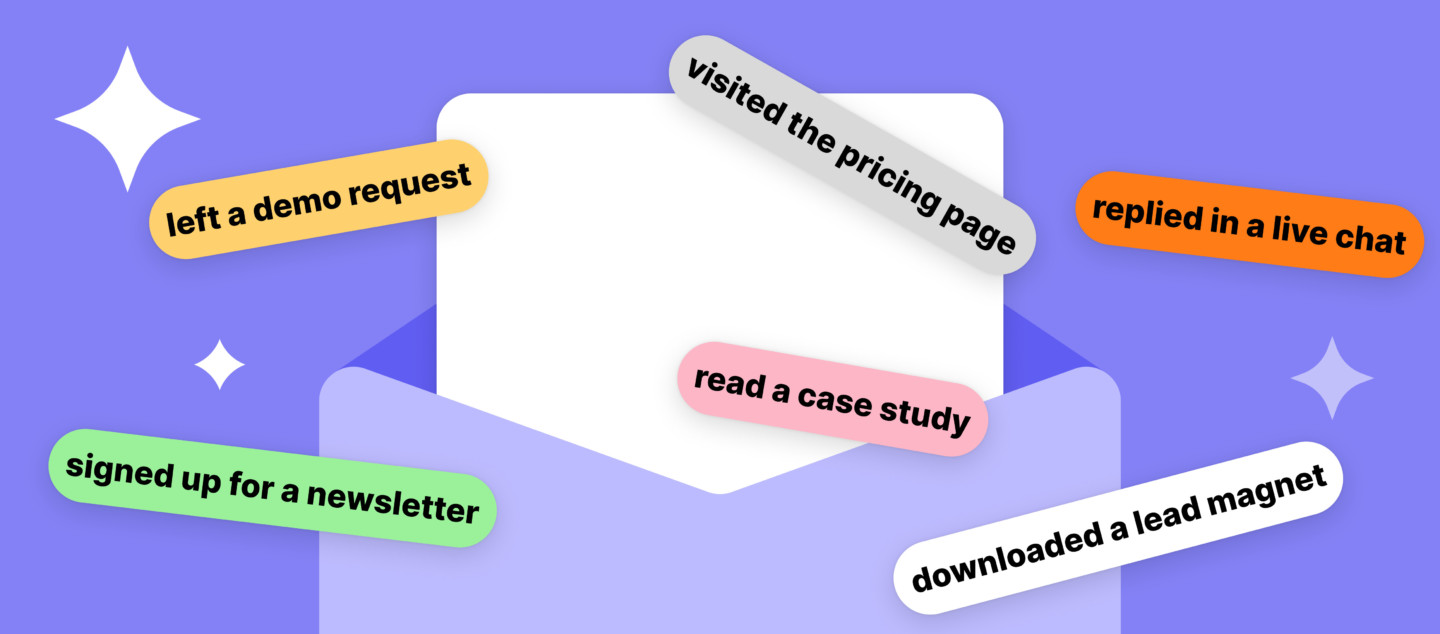
A prospect downloads your pricing guide at 11:47pm. Your nurture sequence emails them four days later, wedged into a Tuesday send with everyone else on the list. By the time it lands, they have already talked to two competitors and half-forgotten why your guide was on their desktop.
That gap between the moment a lead acts and the moment you respond is where most B2B pipeline quietly dies. Event triggered emails close it. Instead of waiting for the next scheduled send, they fire the second a lead does something that matters: downloads a guide, hits a pricing page, lets a trial expire, or goes quiet for two weeks.
This guide covers what event triggered emails actually are, the trigger events worth building around in a B2B lead nurturing program, a step-by-step setup framework, and how to pick a tool that can run all of it without a developer on standby.
What is an event triggered email?
An event triggered email is a message sent automatically in response to a specific action a lead takes, rather than on a fixed calendar date. The trigger can be a page visit, a form fill, a trial expiration, or a drop in product usage. Because the send is tied to real behavior, it arrives while the context is still fresh, which is the core reason trigger-based nurturing outperforms generic drip schedules.
This is different from a purely transactional email like a password reset or a receipt, which fires for operational reasons rather than marketing intent.
Compare that to a standard nurture email: a newsletter or drip step goes out to everyone on a list at the same time, regardless of what each person did last. Triggered emails skip that averaging entirely. A lead who just requested a demo and a lead who has been silent for six weeks get two completely different messages, sent at two completely different moments, because the trigger, not the calendar, decides when.
Event-triggered vs. time-based nurture emails
Event-triggered emails fire on a specific action; time-based (scheduled) emails fire on a fixed cadence regardless of what the lead does. Most mature B2B lead nurturing programs run both, using cadence for steady top-of-funnel education and triggers for anything that needs an immediate, relevant reaction.
The two models solve different problems. A drip sequence is predictable: day one, day three, day seven, and so on, built to slowly build familiarity with a brand. A trigger-based sequence is reactive: it only exists because something happened, and it disappears (or branches) the moment the lead’s status changes.
| Time-based (drip) | Event-triggered |
| Sent on a fixed schedule | Sent when an action occurs |
| Same message for everyone in the segment | Message reflects the specific trigger |
| Good for steady, low-urgency education | Good for anything time-sensitive or high-intent |
| Runs regardless of lead behavior | Stops or branches when behavior changes |
Neither model replaces the other. The practical failure mode is running lead nurturing entirely on drips and treating every high-intent signal, a pricing page visit, a trial about to expire, the same as a cold download from three months ago.
How trigger-based lead nurturing works
Trigger-based lead nurturing runs on a three-step automation workflow: an event is captured, a condition checks whether the lead qualifies for a send, and a personalized message goes out if it does. The loop repeats continuously, so a lead’s nurture experience updates in near real time as their behavior changes.
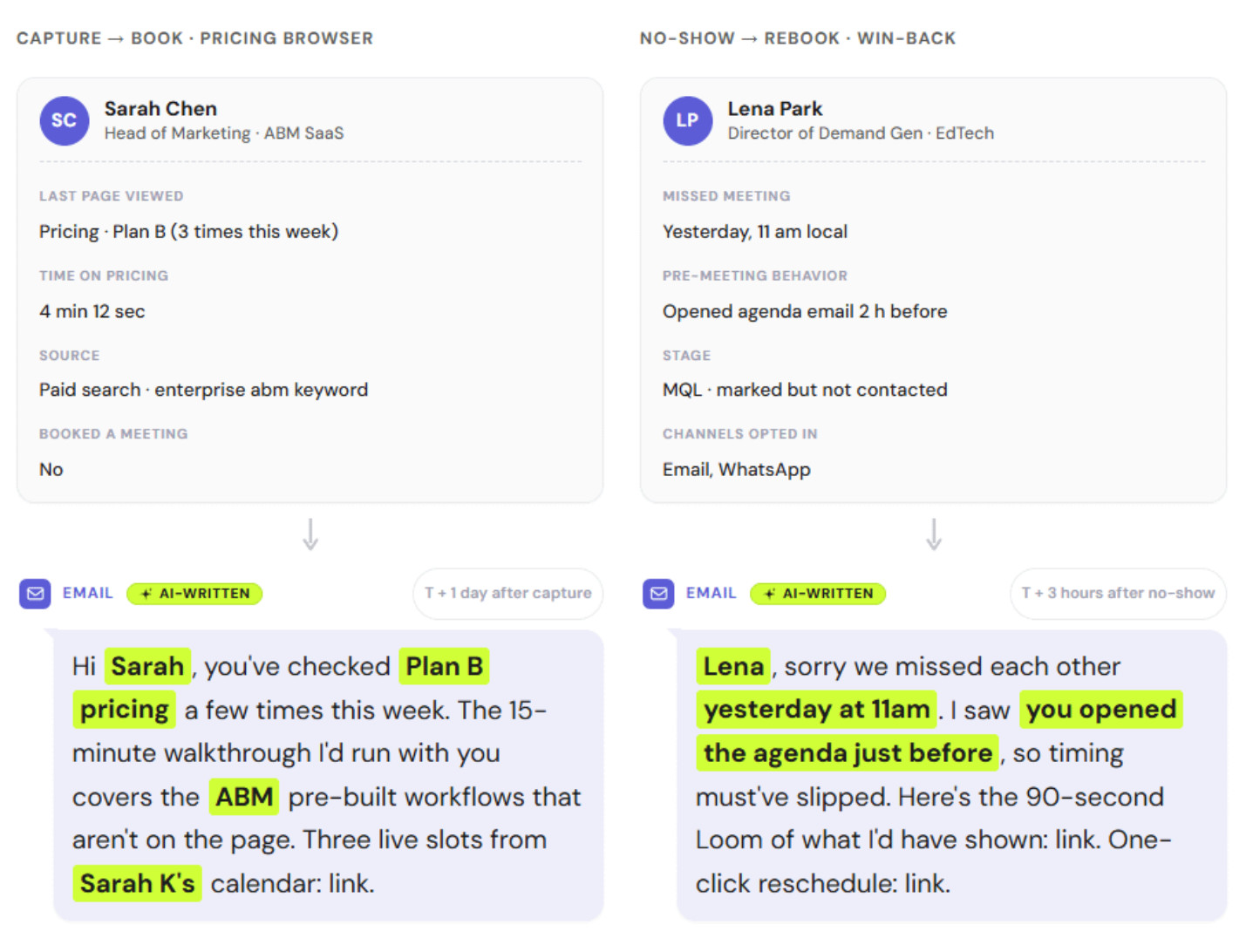
Start with the event. Something has to tell the system a lead did something: a page view, a webhook from your product, a CRM field change, a support ticket closing. That event lands in an event tracking layer, sometimes called a data layer, or a customer data platform, tagged with which lead it belongs to.
Next comes the condition check.
Not every event should trigger a send. A logged-in user viewing the billing page might already be a customer, not a lead. The condition step filters for lifecycle stage, existing tags, or recent sends, so the same raw event produces the right message, or no message at all, depending on who the lead is.
Then the send itself goes out, built with whatever personalization the trigger data supports. It might reference the specific page they viewed, the feature they tried, or the plan their trial was on. Dashly’s engagement scenarios run this same event-to-message logic for in-chat messages, using lead profile data like a pricing page visit or a repeat site visit to pick the moment a conversation starts instead of waiting for the lead to reach out first.
The result feeds back into the lead’s profile. A trigger fired, a send happened, and (ideally) an open or click came back, all recorded against that lead so the next trigger has more context than the last one.
Trigger events that matter for lead nurturing
The trigger events worth building for lead nurturing fall into four groups: engagement signals, lifecycle stage changes, dormancy, and post-conversion moments. Most published guides on this topic default to ecommerce examples like cart abandonment. For B2B lead nurturing, the higher-value triggers sit earlier and later in the funnel than a shopping cart ever does.
Engagement triggers
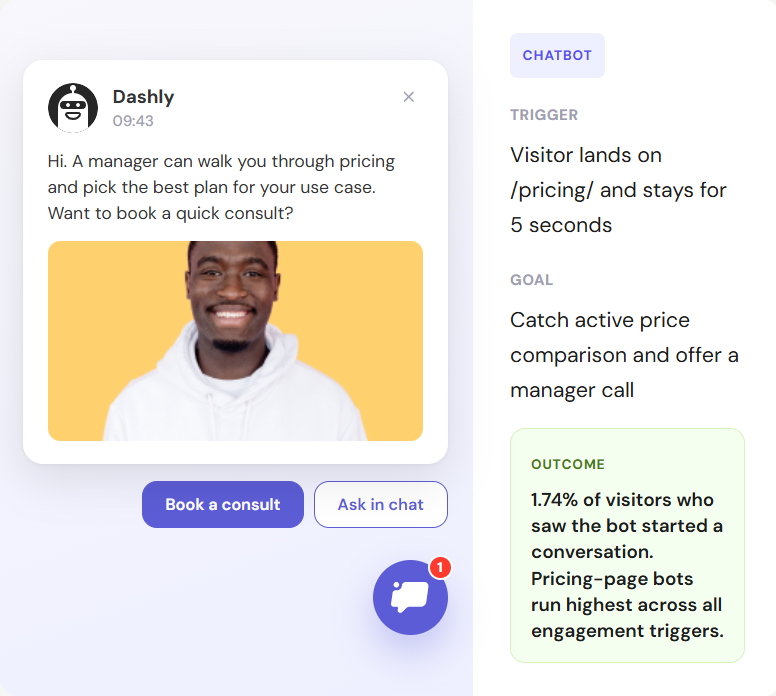
Engagement triggers fire on specific content or page interactions: a gated content download, a repeat visit to a pricing page, or a demo request. These are some of the clearest buying-intent signals available, because the lead chose to act, nobody chased them.
A lead who visits the pricing page twice in one week is a different opportunity than one who downloaded a glossary PDF and never came back. Build separate triggers for each rather than routing both into the same generic “content downloaded” template.
Here’s an example of an engagement message:
Lifecycle and stage-change triggers
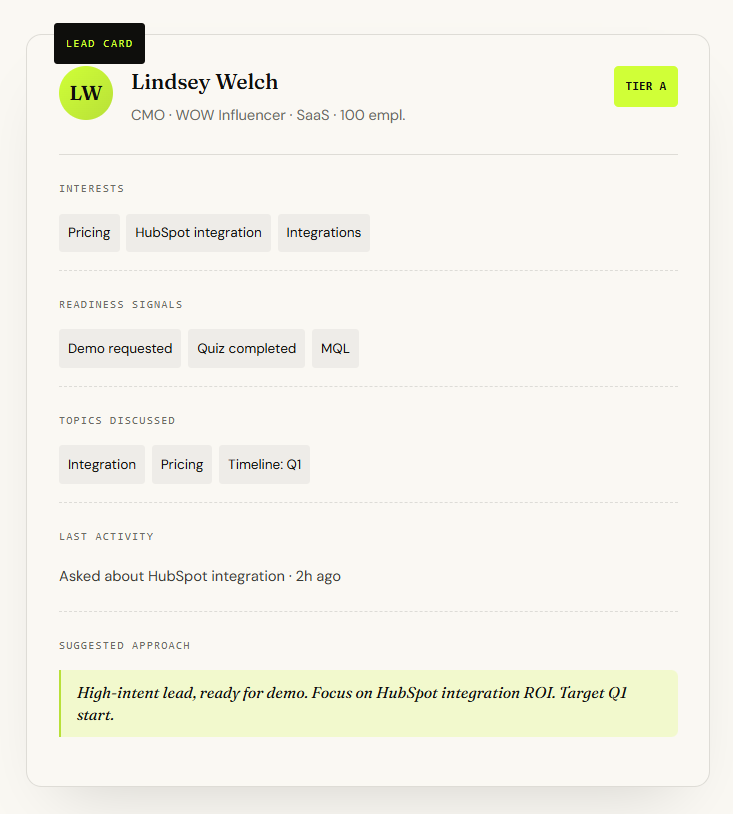
Lifecycle triggers fire when a lead’s status changes: moving from MQL to SQL, a trial starting or approaching expiration, or a jump in product usage that signals readiness to buy. These triggers depend on having lifecycle and usage data, including lead scoring, attached to the lead record, not just page-view history.
A trial expiring in three days with no second login is a fundamentally different trigger than a trial user who has logged in daily and invited three teammates. The first needs a save-the-account message; the second needs an upgrade conversation. Both come from the same event type (trial status) but should never share a template.
This is where a lead profile earns its keep. It’s the single record holding lifecycle stage, product usage, and engagement history together, so a trigger can check all three before deciding what to send.
Re-engagement and dormant-lead triggers
Re-engagement triggers fire when a previously active lead goes quiet, typically after a defined stretch with no opens, clicks, or logins. The goal is to catch the drop-off before the lead is fully cold, not to win back someone who disengaged months ago.
A short message that references what they were last interested in tends to outperform a generic “we miss you” note, because it proves the sequence is aware of their history rather than running on autopilot.
Post-conversion triggers
Post-conversion triggers cover the moments right after a lead takes an action that closes a loop: a purchase, a signed contract, or a completed onboarding step. In B2B, an order or plan-confirmation email is the most common example, and it deserves the same attention as any other trigger even though it feels administrative. See confirmation email best practices for the specifics of getting that single message right.
For newly converted accounts, this is also where an onboarding sequence typically starts, fired by the same signup or contract event that triggered the confirmation email.
Review and feedback requests fit here too, timed to fire once a lead has had enough time in-product to have an opinion worth capturing.
Benefits of event-triggered emails in a nurture sequence
Trigger-based sends consistently beat scheduled campaigns on every core email metric, because relevance and timing both favor an action-based send. According to Klaviyo’s 2026 email marketing benchmarks report, automated flow-based emails deliver a 3x higher click rate (5.58% vs. 1.69%) and a 13x higher placed-order rate than one-off campaigns sent to the same lists. The revenue picture is even more lopsided: Omnisend’s 2025 ecommerce marketing report found that automated emails drove 37% of all email-generated sales in 2024 while accounting for just 2% of total send volume.
That gap is not really about the word “automated.” It is about relevance. A trigger only exists because something specific happened, so the message it sends starts from a position of context a scheduled email can never have. The numbers above come from ecommerce datasets, but the underlying mechanism, matching message timing to a real signal instead of a calendar, applies just as directly to B2B lead nurturing.
List fatigue drops too. Leads stop associating your emails with noise once most of what lands in their inbox is tied to something they actually did. That’s the real driver behind the engagement rate gap between triggers and blasts: relevance, not automation for its own sake.
How to set up trigger-based nurture sequences: a step-by-step framework
Setting up a trigger-based nurture sequence takes five steps: define the trigger event, set qualifying conditions, build the send, test on a small segment, then monitor and iterate. Skipping the qualifying-conditions step is the most common mistake, since it’s what stops a raw event from turning into a spammy, context-free blast.
1. Define the trigger event. Pick one specific, unambiguous action: “viewed pricing page,” “trial expires in 3 days,” “no login in 14 days.” Vague triggers like “showed interest” are impossible to build reliably.
2. Set qualifying conditions. Decide who should NOT get this send even if the event fires: existing customers, leads already in a sales conversation, leads who received a similar trigger in the last 7 days. This is where segmentation earns its keep: the same event should route differently depending on which segment a lead sits in.
3. Build the send. Write copy that references the trigger directly rather than a generic template. Dynamic content blocks make this easier at scale than hand-writing a template per trigger, and personalization here is the whole point of using a trigger instead of a drip.
4. Test on a small segment. Run the new trigger against a limited slice of leads first. Trigger-based sends are easy to get wrong at scale precisely because they fire automatically, with no human reviewing each send.
5. Monitor and iterate. Track open, click-through, and downstream conversion for the trigger specifically, not blended into your overall email average. A trigger with a flat open rate usually means the condition step is too loose and it’s reaching the wrong leads.
Building every sequence from a blank page is optional work. Dashly’s ready-made campaign templates give you a starting set of pre-built trigger messages, so the setup step is mostly adjusting conditions and copy rather than building the trigger logic from scratch.

Choosing a tool for event-triggered lead nurturing
The right tool for event-triggered lead nurturing needs four things:
- Reliable event tracking or an API trigger
- Conditional logic for qualifying sends
- Native CRM or CDP integration
- Solid deliverability at scale
Missing any one of these turns a trigger into either a bottleneck for engineering or a source of irrelevant, badly-timed sends.
Not every marketing automation platform can do all four.
Event tracking is non-negotiable. If the platform can’t ingest product events, page visits, and lifecycle changes without a developer building a custom integration for each one, trigger volume stays small no matter how good the email templates are.
Conditional logic is what separates a trigger platform from a basic email service provider. The qualifying-conditions step from the framework above has to live somewhere, and if the tool can’t express “send this unless X,” every trigger needs a workaround.
CRM or CDP integration matters because triggers are only as good as the lead data behind them. Look for native CRM trigger support, not a bolt-on connector, if lifecycle data lives in your CRM rather than a CDP. A tool that can’t see lifecycle stage or product usage can only ever build engagement-level triggers, never the higher-value lifecycle ones covered above.
For a shortlist built around exactly these criteria, see Dashly’s roundup of AI lead nurturing tools.
Fitting event triggers into your lead nurturing funnel
Event triggers work best as one layer inside a broader lead nurturing strategy, not a replacement for it. Triggers handle the moments that need an immediate, specific reaction; the rest of your lead nurturing program handles the steady education and relationship-building between those moments.
Triggers are a single tactic inside a much longer customer journey, so map them against the stage a lead is actually in rather than building them in isolation. A trigger that fires for a top-of-funnel content download should look and read differently than one firing for a bottom-of-funnel trial expiration, because the lead’s relationship to your product is not the same. The lead nurturing stages framework is the reference point for deciding which trigger belongs at which stage, and for spotting stages that currently have no trigger coverage at all.
That gap analysis is usually the most useful output of this exercise. Most teams have triggers for the obvious moments, form fills, purchases, and a blank stretch in the middle where a lead can sit for weeks with nothing but a generic drip watching them.
Conclusion
Event triggered emails fire on what a lead does, not on what day it is, which is why they consistently outperform scheduled sends on open rate, click rate, and revenue per send. The highest-value triggers for B2B lead nurturing are not cart abandonment or shipping notifications; they are engagement signals, lifecycle stage changes, dormancy, and the post-conversion moments that close a loop.
Building them well takes a specific event, a qualifying condition, and a message that actually reflects both, tested small before it runs at scale. Get those three right and triggers stop being a technical feature and start being the layer of your lead nurturing program that responds the moment a lead is actually worth talking to.
FAQ
An event triggered email is a message sent automatically when a lead takes a specific action, such as visiting a pricing page, letting a trial expire, or going quiet for a set period, rather than being sent on a fixed calendar schedule.
All triggered emails are automated, but not all automated emails are triggered. A scheduled drip campaign is automated but runs on a calendar regardless of behavior. A triggered email is automated and fires only when a specific event occurs.
The most useful trigger events for B2B lead nurturing are engagement signals like pricing page visits or content downloads, lifecycle changes like MQL to SQL or trial expiration, dormancy after a period of inactivity, and post-conversion moments like an order confirmation or review request.
They serve different purposes rather than one replacing the other. Triggered emails outperform scheduled sends on open rate, click rate, and revenue per send because they react to a specific, relevant event, while scheduled drips are better suited to steady, low-urgency education over time.
Look for a platform with reliable event tracking or API access, conditional logic to qualify who receives a send, native CRM or CDP integration, and strong deliverability at scale. Missing any of these limits how sophisticated your triggers can get.
Yes. Most published examples focus on ecommerce triggers like cart abandonment, but B2B SaaS has its own high-value trigger events, including trial expiration, product usage drops, and MQL-to-SQL stage changes, that tend to matter more for lead nurturing than any ecommerce example.
Not quite. A classic autoresponder sends one fixed reply to one fixed event, like a form submission, with no conditional logic. A triggered email uses the same kind of event but adds qualifying conditions, so the same event can produce different messages, or none at all, depending on who the lead is.
A win-back campaign is usually a short, scheduled series aimed at leads who have been inactive for a long time, often with an incentive attached. A re-engagement trigger fires earlier, the moment a lead crosses a shorter inactivity threshold, aiming to catch the drop-off before the lead needs winning back at all.




![Lead nurturing: definition, strategy & examples [2026]](https://www.dashly.io/blog/wp-content/uploads/2020/05/image-1-720x308.jpg)

![What is sales enablement? Definite guide + Strategy + Tools for 2024 [CSO edition]](https://www.dashly.io/blog/wp-content/uploads/2021/03/sales-enablement-720x308.jpg)