WhatsApp lead nurturing: Turn captured leads into pipeline with automated sequences in 2026
 17 minutes
 22.07.2026
A prospect messages your WhatsApp Business number, gets a fast reply, and then goes quiet for three weeks. Your team captured the lead. Nobody nurtured it. That gap between the first WhatsApp reply and the next meaningful touch is where most B2B pipeline quietly dies, and almost no guide on WhatsApp lead generation tells you what to do about it.
Every popular WhatsApp guide covers how to capture the lead: click-to-chat ads, QR codes, chat widgets, WhatsApp Flows. Almost none of them cover what happens after that first message, which is the part that actually turns a chat into revenue.
This guide is about the second half of the problem. You’ll get a concrete drip cadence you can copy, real follow-up message examples, a way to score leads from conversation signals instead of guesswork, and a compliance-safe way to keep messaging inside WhatsApp’s rules. If you already run inbound lead generation through other channels, the same nurture logic applies here, just faster.
What is WhatsApp lead nurturing?
WhatsApp lead nurturing is the process of sending a structured sequence of follow-up messages to a lead after they first contact your business on WhatsApp, with the goal of moving them from an open conversation to a qualified, sales-ready opportunity. It is what happens after lead generation, not instead of it.
Lead generation gets someone into the chat. Nurturing convinces them to stay.
Most WhatsApp guides on the market conflate the two. Search “whatsapp lead generation” and you’ll find detailed breakdowns of click-to-chat ads, catalog messages, and broadcast lists, but almost nothing about the cadence, tone, or scoring logic that turns that initial chat into a closed deal. That’s the gap this article closes. The rest of this guide walks through the second half: the funnel, the cadence, the messages, and the tools that support it.
Why WhatsApp outperforms email and SMS for lead nurturing
WhatsApp outperforms email and SMS for lead nurturing because people actually open it. Industry benchmarks put WhatsApp business message open rates near 98%, against roughly 20% for email. A nurture message sent on WhatsApp has a real chance of being seen within minutes, not days.
That speed advantage compounds during nurturing. A lead who reads your Day 1 follow-up within minutes can reply the same day, ask a clarifying question, and move to Day 3 content while they’re still actively evaluating. On email, the same lead might not open your message for two or three days, by which point their attention, and their budget window, has moved on.
Fast response wins deals long before nurturing even starts.
SMS technically shares WhatsApp’s speed advantage, but it loses on format. A WhatsApp message can carry a product catalog, a calendar link, a short video, or a quick-reply button, none of which fit into a 160-character SMS. It also carries read receipts and typing indicators, so your nurture sequence can react to real signals instead of guessing whether a lead saw the message. And because WhatsApp conversations persist as a single thread, the lead’s entire history sits in front of the next person who picks up the conversation, unlike SMS threads that get lost across carriers and devices.
Channel speed only helps if you use it deliberately. The next section maps out exactly where WhatsApp nurturing fits inside the broader lead funnel.
The WhatsApp lead nurturing funnel: from capture to qualified pipeline
The WhatsApp lead nurturing funnel has four stages: capture, nurture, qualify, and handoff. A lead enters through a click-to-chat ad, QR code, or chat widget, gets a nurture sequence instead of a single reply, gets scored and segmented based on how they respond, and only then reaches a human rep or an AI qualifier for a scheduling handoff. Think of it as your WhatsApp sales funnel: each stage needs a clear entry and exit condition, not just a label.
- Capture, a lead opens a WhatsApp chat via an ad, QR code, or widget
- Nurture, an automated sequence keeps the conversation active
- Qualify, scoring rules read engagement signals from each reply
- Handoff, a qualified lead reaches a rep or AI agent for scheduling
Most teams only build the first stage. They wire up a chat widget or a click-to-chat ad, celebrate the lead count in their dashboard, and stop there. The lead sits in the inbox as an unread WhatsApp thread until someone manually remembers to follow up, if anyone does.
Nurturing is the stage that closes that gap, and skipping it stretches your sales cycle by leaving qualification to chance.
The goal at the nurture stage is to keep the conversation moving without a human writing every message by hand. Dashly’s lead nurturing workflows do this by triggering a pre-built message sequence across email, WhatsApp, and SMS the moment a lead enters a segment, so the lead gets a relevant follow-up whether or not a rep is online. The mechanism matters more than the tool: whatever you use, the sequence needs to fire automatically and adjust based on what the lead does next, not run on a fixed timer regardless of engagement.
Here’s an example of an AI flow for booking a meeting that includes WhatsApp messages:
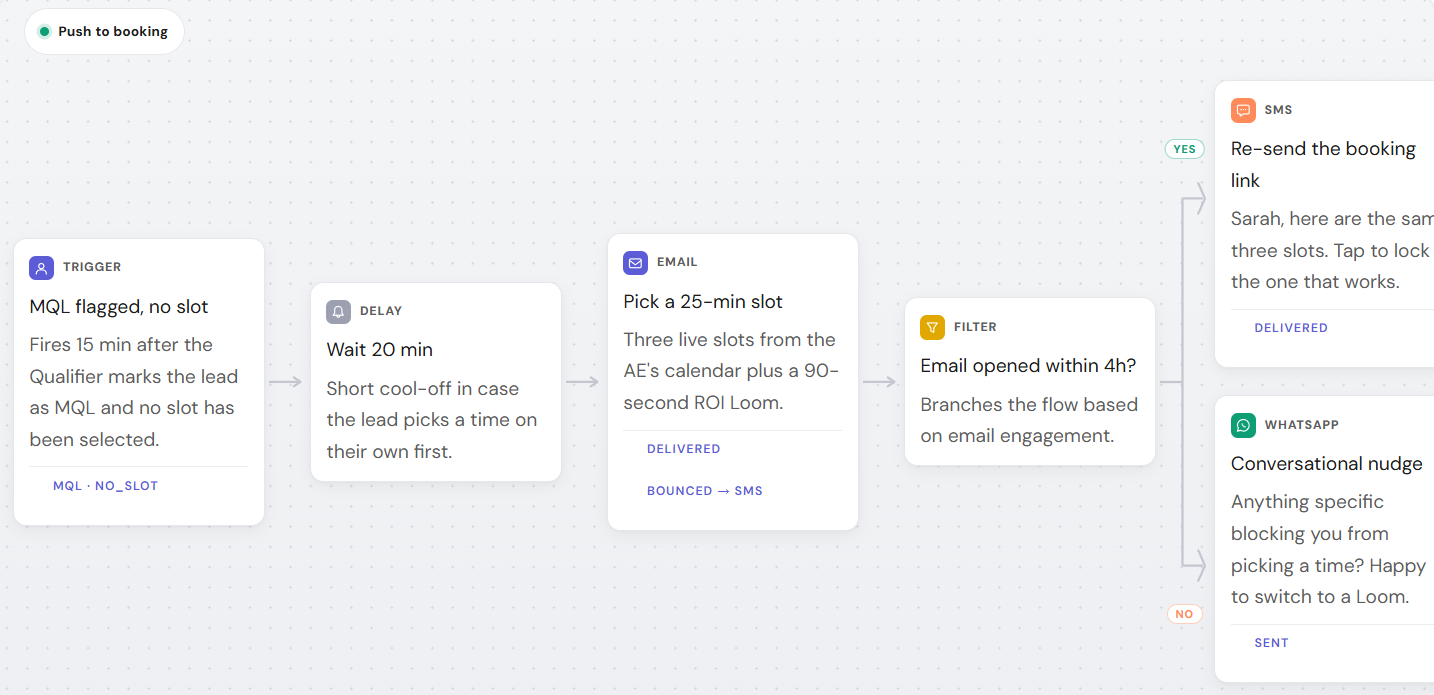
Deep-dive on qualification comes in a later section. For now, the important part is that qualification should happen continuously through the nurture sequence, not as a separate step at the end. Every reply, every ignored message, and every clicked link is a signal you can score.
The next four sections walk through each of those stages in the order a lead actually experiences them, starting with the cadence itself.
Build a WhatsApp drip nurture sequence, with a cadence template
A WhatsApp drip nurture sequence is a fixed series of automated follow-up messages sent on a set cadence after a lead’s first contact. Each message serves one job: reduce friction, answer an objection, or move the lead to the next qualifying question. A working starting cadence is Day 0, Day 1, Day 3, Day 7, and Day 14.
| Day | Goal | Message example |
|---|---|---|
| Day 0 (same session) | Confirm intent, set expectations | “Thanks for reaching out. I can answer pricing questions right here, or set up a 15-minute call if that’s easier. Which works?” |
| Day 1 | Answer the most common objection | “Most teams ask about [X] first. Quick answer: …” |
| Day 3 | Add proof | Share a relevant resource, case study, or comparison link |
| Day 7 | Re-qualify with a light question | “Still exploring this, or has priority shifted?” |
| Day 14 | Last-call re-engagement | “I’ll stop the check-ins here unless you want me to keep going. Just reply and I will.” |
Every message in that cadence should pull at least one variable from the lead’s own conversation: their stated use case, company size, or the specific question they asked on Day 0. A generic “just checking in” message on Day 7 reads as automated even when a human wrote it. A message that references what the lead actually said on Day 0 reads as attentive, whether a human or an AI agent sent it.
The spacing matters as much as the content. Message too often and the lead mutes the thread or blocks the number, which is the single biggest risk WhatsApp nurturing carries that email doesn’t. Message too rarely and you lose the speed advantage that makes WhatsApp worth using in the first place. The five-touch, two-week cadence above is a starting point, not a rule. Track reply rates at each step, and if Day 3 consistently gets ignored while Day 7 gets replies, cut Day 3 and start over from what the data shows instead of what the template assumed.
A drip sequence is not the same as a broadcast message. Broadcasts send one message to an entire list at once; a drip sequence adapts to each lead’s own timeline and replies. Use broadcasts for announcements, not for nurturing individual leads through a funnel.
Here’s an example of a WhatsApp message based on user behavior:
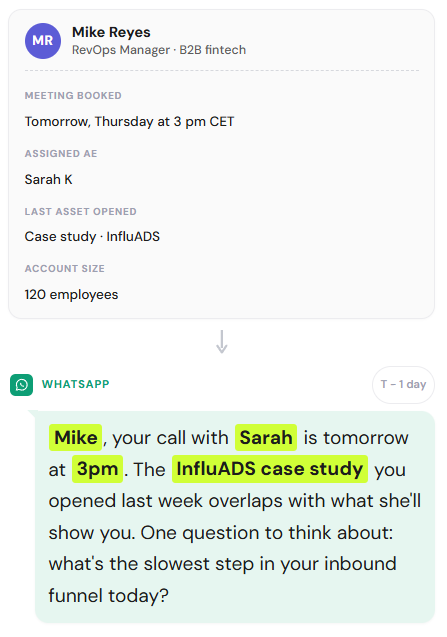
Not every step needs to be fully automated. If a lead responds with a specific pricing question or asks to speak to someone, that reply should interrupt the sequence and route to a human or an AI qualifier immediately, not wait for the next scheduled touch. The cadence is a default path for leads who haven’t shown high intent yet, not a script every lead has to sit through regardless of what they say.
A good drip sequence should be interruptible. That’s the difference between automation and a script.
Automate follow-up messages without sounding robotic
A good WhatsApp follow-up message references something specific the lead said or did, states one clear next step, and gives an easy way to opt out of further messages. The examples that work well are short, conversational, and never repeat the exact wording used in the previous message in the sequence.
According to Chili Piper’s speed-to-lead research, teams responding to a new lead within 60 seconds saw 391% higher conversion rates than slower responders. A same-session Day 0 message like the ones above is designed to capture exactly that window.
Notice none of those messages open with “Hi [Name], I hope this message finds you well.” That phrasing reads as a mail merge even inside WhatsApp, where the format signals a real person messaging in real time. Keep each message under three sentences, ask one question at a time, and always give the lead a graceful way to say “not now” without feeling like they’re rejecting a person.
A message that’s easy to ignore is worse than no message at all.
Getting the wording right solves half the problem. The other half is knowing which leads deserve more attention than others, which is what scoring is for.
Score and segment leads from WhatsApp conversations
Score WhatsApp leads on three signals from the conversation itself: response speed, the specificity of what they ask, and how far they get through the nurture cadence before going quiet. A lead who replies within an hour and asks a pricing question is a different segment than one who reads a Day 1 message and never responds again. That’s lead scoring applied to a WhatsApp thread instead of a CRM field.
Response speed is the easiest signal to act on. A lead who replies to your Day 0 message within the same session is showing more intent than one who takes three days, and that difference should change what they receive next, not just how you feel about the lead internally.
Message content is the second signal. A question about pricing, implementation timeline, or a specific feature is a stronger buying signal than a generic “tell me more.” Route the first group toward a qualification conversation immediately; keep the second group in the standard cadence a little longer.
Scoring only helps if the signals end up somewhere a rep can act on. Dashly’s lead profile merges the WhatsApp conversation history with everything else known about that contact, email opens, page visits, deal stage, so a rep opening the lead card sees the full picture instead of a WhatsApp thread with no context.
Segmentation should split leads into no more than three or four buckets:
- High-intent leads go straight to a human or AI qualifier
- Standard leads continue on the default cadence
- Slow-to-respond leads get a longer interval between touches
- Unresponsive leads move to the re-engagement track covered next
More buckets than that and the logic becomes too complex to maintain by hand or explain to a new rep joining the team.
Re-engage cold and inactive WhatsApp leads
A WhatsApp lead becomes “cold” after it stops responding to two or more scheduled nurture messages, typically around the Day 7 to Day 14 mark. Re-engaging a cold lead needs a different message than the standard cadence: acknowledge the silence directly, offer a low-commitment next step, and set a clear point where you’ll stop messaging if there’s still no response.
Most teams either give up on a cold lead entirely or keep sending the same generic check-in every few weeks, which trains the lead to ignore the thread permanently. Neither approach recovers pipeline that’s still recoverable.
Dashly’s multi-channel lead nurturing runs the win-back sequence across email, WhatsApp, and SMS instead of a single channel, so a lead who stopped replying on WhatsApp can still get pulled back through a different channel, and a recovered lead moves straight back into the booking flow instead of restarting from scratch.
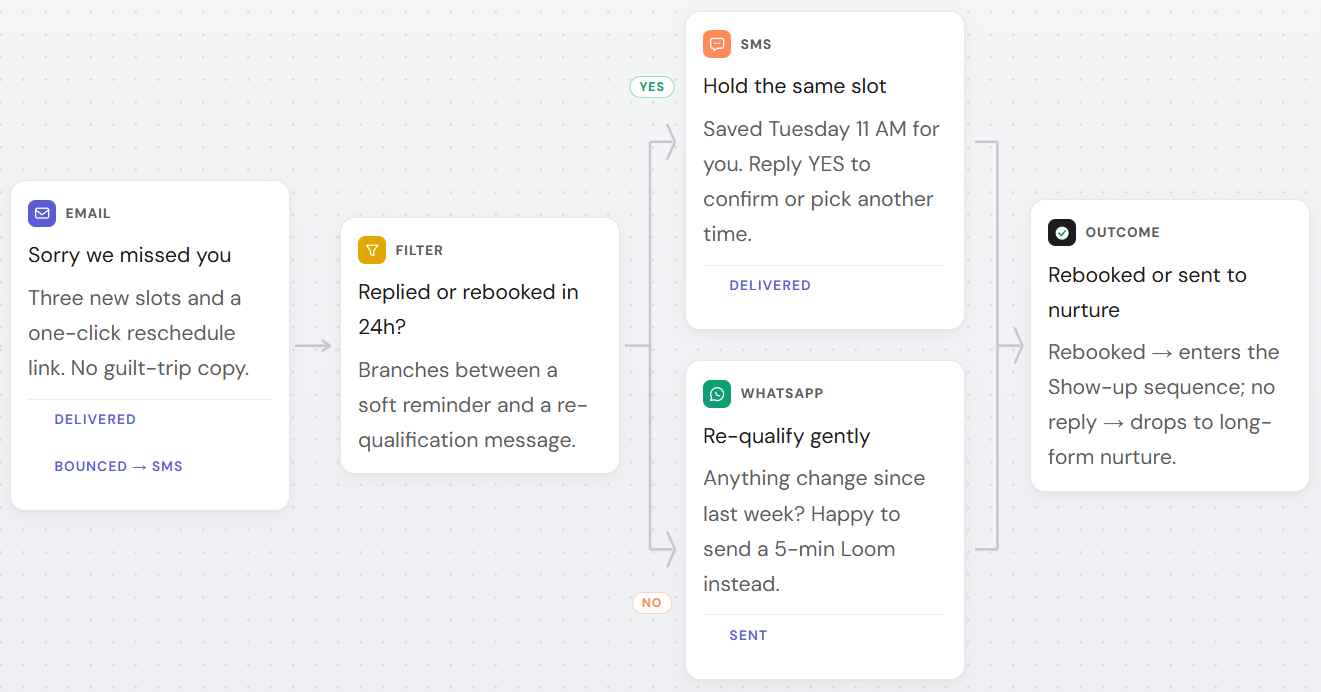
Timing a win-back message to a real signal beats timing it to a calendar.
A practical win-back sequence has two messages, not five. The first re-opens the conversation with something specific, for example “Saw you checked out our pricing page again, still evaluating?” The second, sent only if the first gets no reply within 48 hours, offers to close the loop entirely: “I’ll assume the timing’s off for now. Reply anytime if that changes.” That second message matters more than it looks. It respects the lead’s attention, and it often gets a reply specifically because it removes pressure.
Stay compliant with WhatsApp’s 24-hour messaging window
WhatsApp’s 24-hour customer service window opens the moment a lead messages you, and it resets every time they message again. Inside that window you can send any message format freely. Outside it, Meta’s WhatsApp Business Platform documentation requires every message to use a pre-approved template, which limits formatting and adds a small per-message cost in most regions.
Compliance also depends on how the lead entered the conversation. If they messaged you first, you already have opt-in consent for service messages inside the window. If you added their number to a list without them messaging first, you need explicit opt-in before sending anything, template or not.
That rule directly shapes how you design a nurture cadence. A Day 0 or Day 1 message sent while the window is still open can be a free-form, conversational message. A Day 7 or Day 14 message, sent after the lead has gone quiet for days, almost always falls outside the window and needs a pre-approved template instead.
None of this is optional. WhatsApp enforces the window automatically and blocks messages that don’t comply.
This is also where WhatsApp Business API access matters. A WhatsApp Business API integration handles template approval and window tracking automatically, so a rep or an automated sequence doesn’t have to check manually whether a given lead’s window is still open before sending the next step.
Build the compliance check into the cadence itself, not into a separate manual step someone has to remember every time a lead falls quiet.
Combine WhatsApp with email and live chat for a full nurture sequence
WhatsApp works best as one channel in a broader nurture sequence, not a replacement for email or live chat. Use WhatsApp for time-sensitive, short exchanges; use email for longer content like case studies or pricing sheets; and use live chat for leads already on your website who expect an instant answer in that moment.
The mistake most teams make is running each channel on its own separate cadence, so a lead gets a WhatsApp follow-up and an unrelated email on the same day, referencing nothing about each other. That reads as two different companies messaging the same person by coincidence.
Coordinating that requires one system that sees every channel a lead touched, not three separate ones that don’t talk to each other. A lead who replies on WhatsApp shouldn’t also get the email sequence’s “still there?” message the next morning, and a lead who goes cold on email should be a candidate for a WhatsApp touch instead of just falling out of the funnel.
A simple rule that works without heavy tooling: pick one channel as the lead’s “home” channel based on where they first replied, and only escalate to a second channel if the home channel goes quiet for a full cadence cycle. That keeps the lead from feeling chased across three inboxes while still giving you a fallback if one channel doesn’t land.
This is marketing automation applied to a channel most teams still run by hand. Channel coordination solves the delivery problem. Choosing the right tool to run all of this solves the operational one.
WhatsApp lead nurturing tools to consider in 2026
The right WhatsApp lead nurturing tool needs three things: native WhatsApp Business API access, not a personal WhatsApp Web workaround; a way to trigger sequences from conversation signals rather than fixed timers; and CRM sync so scoring and segmentation don’t live in a separate spreadsheet. Missing any one of the three means someone on the team ends up doing that step by hand.
API access matters because unofficial WhatsApp automation tools risk the business number getting banned, which resets every conversation history and every nurture sequence in progress. Trigger-based sequencing matters because a fixed-timer drip ignores the exact signals covered earlier in this guide, response speed, message content, and cadence position, that should be changing what a lead receives next.
A rule-based chatbot can fire the cadence on schedule, but it can’t read intent from an open-ended reply. Conversational AI, the kind behind an AI agent, can parse a reply like “maybe later, need budget approval” and route it correctly instead of forcing the lead into a fixed decision tree.
Dashly’s AI lead nurturing tools directory compares options across those three criteria if you’re evaluating more than one platform. For a narrower shortlist, the best AI lead nurturing tools of 2026 roundup breaks down pricing and setup complexity side by side.
The tool matters less than whether the cadence behind it is actually built. Everything in this guide, the funnel, the drip cadence, the scoring logic, works whether you build it inside a dedicated platform or stitch it together from a CRM and a WhatsApp API provider. Start with the cadence. The tool comes second.
Conclusion
WhatsApp lead nurturing is the part that starts after the chat opens:
- A cadence that adjusts to what the lead actually does
- Follow-up messages that reference their own words back to them
- Scoring based on real conversation signals instead of guesswork
- A re-engagement track for leads who go quiet, instead of writing them off
Most teams still skip all of it.
Start with the five-touch cadence from earlier in this guide. Track reply rates at each step for two weeks, cut whatever isn’t working, and layer in scoring once the basic cadence is running reliably. The compliance and channel-coordination pieces matter, but they’re refinements on a working cadence, not prerequisites for starting one. If WhatsApp is one of several lead sources feeding your pipeline, the same pipeline generation strategy principles apply: define what counts as a qualified lead before you build the nurture sequence, not after.
FAQ
WhatsApp lead nurturing is the practice of sending a structured, automated sequence of follow-up messages to a lead after their first WhatsApp contact, with the goal of moving them toward a qualified sales conversation instead of letting the thread go cold.
A WhatsApp customer relationship management (CRM) tool for lead nurturing syncs conversation history to the lead’s record, triggers a pre-built message sequence based on segment or behavior, and lets a rep see the full WhatsApp thread alongside other channel activity before following up manually.
A good example references something specific the lead said, in three sentences or fewer: ‘Thanks for asking about X earlier. Here’s the direct answer, plus a 15-minute slot if it’s easier to talk it through.’
A common starting cadence is five touches across two weeks: Day 0, Day 1, Day 3, Day 7, and Day 14. Adjust the interval based on reply rates rather than following the schedule rigidly once you have a few weeks of data.
Yes. An AI agent can trigger the right message based on conversation signals, score leads from response speed and content, and hand off high-intent leads to a rep, without a human writing or sending each follow-up manually.
It’s the window that opens when a lead messages your business number and closes 24 hours after their last message. Inside the window you can send free-form messages; outside it, you need a pre-approved message template.
Look for native WhatsApp Business API access, trigger-based sequencing instead of fixed timers, and CRM sync for scoring and segmentation. Dedicated directories like Dashly’s AI lead nurturing tools list break down options against those criteria.



![Lead nurturing: definition, strategy & examples [2026]](https://www.dashly.io/blog/wp-content/uploads/2020/05/image-1-720x308.jpg)