How to automate customer service: a step-by-step guide for B2B SaaS teams in 2026
 14 minutes
 26.06.2026
The average B2B SaaS support team handles 400+ tickets a month with three to five people. Volume keeps growing. Headcount does not. So teams end up in a familiar trap: response times slip, CSAT drops, and good agents burn out repeating the same answers on loop.
Customer service automation breaks that pattern. By removing humans from the work that does not need them.
This guide covers six steps to automate customer service in a B2B SaaS environment: what to automate, what to keep human, which tools to consider in 2026, and how to measure whether it is working.
What is customer service automation?
Customer service automation uses software and AI to handle routine customer interactions without a human agent touching every ticket. It covers FAQ bots, ticket routing, self-service portals, AI agents, and automated workflows. The goal is to deflect repeatable requests so human agents focus on complex cases that genuinely need judgment.
That is customer service automation at its core.
Most teams think of automation as a binary: either a human handles the ticket or a bot does. In practice, there are three distinct levels, and each requires a different toolset.
- Level 1: Rule-based bots. Also called customer service chatbots, they follow fixed decision trees. Answer predefined questions. Break outside the script. Deflect under 10% of tickets.
- Level 2: Workflow automation. Auto-assign tickets, trigger email responses, apply tags, route by topic. No natural language understanding. Reduces agent time per ticket without replacing human responses.
- Level 3: AI agents. Use natural language processing (NLP) to understand customer queries, pull from a knowledge base, take actions (look up account data, update records), and escalate with full context when they cannot resolve. Deflect 60 to 70% of Tier-1 tickets.
Customer service automation is the practice of using software, AI, and rule-based workflows to handle customer requests without requiring a human decision at every step. Customer support automation ranges from simple rule-based chatbots to AI agents that resolve issues end-to-end.
Dashly’s AI support agent operates at Level 3. It resolves Tier-1 queries end-to-end rather than deflecting to a human by default. When it cannot resolve an issue, it escalates with the full conversation context, account data, and a suggested category already attached.
Why automate customer service in 2026?
Automating customer service delivers three measurable outcomes: 37% faster first response times, 60 to 70% Tier-1 ticket deflection with an AI agent, and 24/7 coverage without additional headcount. The business case for automation in customer service in 2026 is about protecting service quality at volume as ticket volumes rise and team sizes stay flat.
Response time. Teams using automation see 37% faster first response times and 52% faster resolution, according to DevRev’s 2026 analysis of automated customer service deployments. That is not marginal. It is the difference between a ticket resolved in hours versus a ticket abandoned after a frustrating wait.
Volume and expectations. 74% of customer service leaders expect contact volumes to keep rising, and 75% of online customers already expect a response within five minutes. Meanwhile, 33% of US-based CS organizations are already operating with reduced headcount. Automation is how teams absorb both pressures without burning out the agents they still have.
24/7 coverage without 24/7 headcount. An AI agent handles queries in real time, outside business hours, across time zones, at whatever volume the queue demands. The alternative is shift work or missed tickets. Neither is sustainable for a lean SaaS team.
What to automate, and what to keep human
Automate routine customer service tasks where the answer is the same every time: FAQs, order and account status, billing questions, password resets, and Tier-1 troubleshooting with known fixes. Keep humans for high-stakes interactions: churn signals, refund disputes, VIP accounts, and cases where a wrong answer creates contractual risk.
The biggest mistake teams make is trying to automate everything at once. The second biggest is automating the wrong things. Before choosing a tool or building a workflow, map your ticket types into two buckets: safe to automate, and keep human.
| Automate | Keep human |
|---|---|
| Routine FAQs (hours, pricing, features) | High-stakes complaints and refund disputes |
| Order and account status queries | Churn risk signals (frustration, cancellation intent) |
| Onboarding checklist questions | Complex technical issues with multiple dependencies |
| Password resets and access issues | VIP accounts and high-contract-value customers |
| Billing FAQ (invoice format, payment methods) | Emotionally charged interactions |
| Tier-1 troubleshooting with known fixes | Any issue where a wrong answer creates legal or contractual risk |
A useful rule: if the answer is the same every time and a wrong answer costs nothing, automate it. If a wrong answer costs a customer or damages the relationship, keep a human in the loop.
Dashly’s AI support agent applies this logic at the ticket level. You configure escalation triggers, such as negative sentiment, specific keywords like “cancel” or “legal,” or deal value above a set threshold. The agent routes to a human automatically when any trigger fires, with the conversation context already attached.
How to automate customer service in 6 steps
To automate customer service, follow six steps in sequence: audit your ticket categories, build a self-service knowledge base, add an AI agent to live chat, automate email and ticket workflows, add proactive messaging, then measure and optimize. The first wins arrive within 30 days of deploying Step 3. Skip Step 1, and every downstream decision is a guess.
Step 1: Audit your ticket categories
Pull your last 30 days of tickets. Categorize the top 10 query types by volume. You are looking for three clusters: questions with a single correct answer (automate immediately), questions that vary by account (automate with personalization), and questions that require judgment (keep human for now).
Most B2B SaaS teams find that roughly half their tickets fall into the first cluster, straightforward questions with a single correct answer. Knowing which customer service tasks to automate first is what turns Week 1 into a visible win, rather than a six-month project.
Step 2: Build a self-service knowledge base
Before adding any AI, give customers a self-service portal where they can find answers independently. A well-structured knowledge base typically deflects 25 to 40% of tickets, a common benchmark across B2B SaaS support teams. Write articles for the top five query types from your audit. Keep each article to one problem, one fix, and one outcome.
Connect the knowledge base to your chat widget. An AI agent that cannot pull from a knowledge base is guessing. One that can is resolving.
Step 3: Add an AI agent to live chat
With a knowledge base in place, an AI agent has something to work from. Configure it to handle Tier-1 queries from your audit’s first cluster, and route Tier-2 to a human with the full conversation context passed along. The agent handles the first response. The human picks up from there, already informed.
This is the step with the highest deflection payoff. Teams that deploy an AI agent at this stage typically see deflection rates of 50 to 70% within the first 60 days, depending on knowledge base coverage, consistent with Dashly’s AI support agent data, which shows 40 to 80% resolution across deployments.
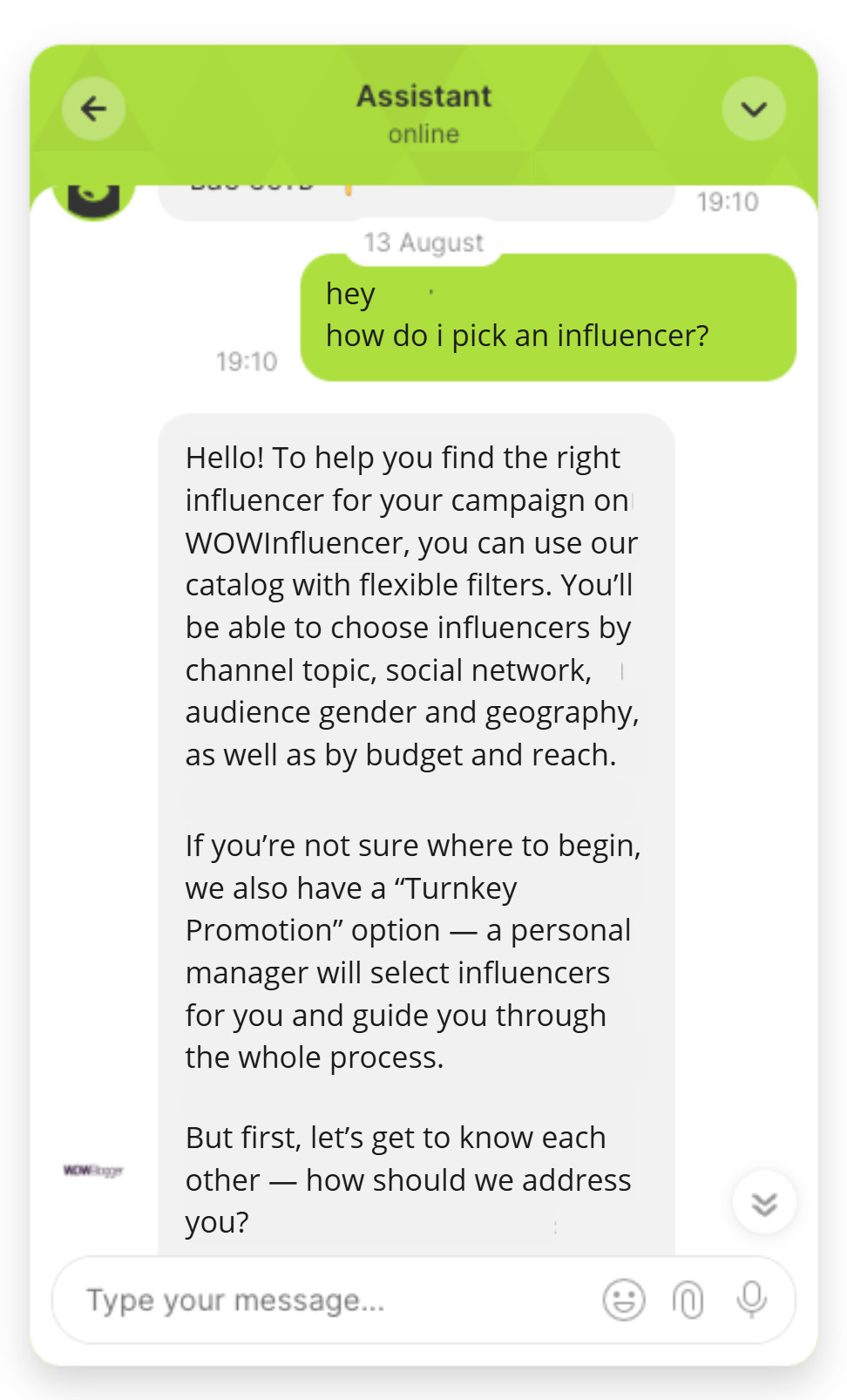
Here’s how the AI agent supports users:
Step 4: Automate email and ticket workflows
Not every interaction starts in chat. Email, form submissions, and in-app reports all create tickets. Automate the triage layer:
- Auto-tag incoming tickets by topic
- Auto-assign by category to the correct agent queue
- Send an acknowledgment with an estimated response time
- Trigger canned responses for the most common query types
Keep routing rules consistent across all channels. A ticket that gets manually re-routed is a ticket that slows down.
Step 5: Add proactive messaging
The best way to manage inbound support volume is to answer questions before they are asked. Proactive messages, triggered by product events, billing milestones, or usage patterns, reduce inbound by surfacing information at the moment the customer needs it, before they open a ticket.
Common triggers: post-signup onboarding, day-three activation check, billing cycle reminders, error events, feature rollout announcements. Each one prevents a ticket. At scale, that is a measurable reduction in queue volume.
Step 6: Measure and optimize
Automation is not a set-and-forget system. Before you start tracking, document your customer service workflows so the baseline is clear before you measure. Then track deflection rate, first response time, and CSAT weekly for the first 90 days. The early data tells you which queries the AI is getting wrong, which knowledge-base articles are missing, and where human escalation is happening more than it should.
5 customer service automation tools in 2026
The five customer service automation tools worth evaluating for B2B SaaS in 2026 are Dashly (best for teams of 3 to 15), Intercom (mid-market), Zendesk (enterprise), Freshdesk (SMB), and HubSpot Service Hub (CRM-first teams). The right choice depends on team size, current stack, and how far along you are in the six-step automation sequence above.
| Tool | Best for | Standout feature | Limitation |
|---|---|---|---|
| Dashly | B2B SaaS teams | AI support agent resolves Tier-1 queries end-to-end, with configurable escalation triggers | Designed for SaaS; less suited for e-commerce or call-center environments |
| Intercom | Mid-market SaaS | Fin AI with strong knowledge-base integration and an intuitive workflow builder | Pricing scales steeply; expensive for teams handling high volume |
| Zendesk | Enterprise support teams | Deep ticketing infrastructure plus AI Copilot for agent assist | Complex setup; overkill for teams under 20 agents |
| Freshdesk | SMB teams on a budget | Affordable omnichannel coverage with solid automation rules | AI features are less mature than Intercom or Dashly |
| HubSpot Service Hub | CRM-first teams already in HubSpot | Unified customer data across marketing, sales, and support | Automation features are basic compared to dedicated CS tools |
For a deeper comparison of any customer service automation platform, including pricing and feature analysis, see the full guide to best AI customer support tools.
Real examples of customer service automation in B2B SaaS
Theory is useful. What actually happens when a B2B SaaS team automates customer service? Three scenarios, each with a concrete problem, mechanism, and outcome.
Example 1: Onboarding support
Problem. A SaaS team sees 40% of their weekly ticket volume asking the same setup questions: “How do I connect X integration?”, “Where do I find the API key?”, “Why is the import not working?” Agents spend two hours a day on answers that have not changed in six months.
Mechanism. The team builds five knowledge-base articles covering the top setup questions, connects them to a chat AI agent, and sets a trigger: any ticket tagged “onboarding” routes to the AI first. The agent retrieves the relevant article, confirms resolution, and closes the ticket if the customer confirms it helped.
Outcome. Tier-1 onboarding tickets drop by 40%. Agents redirect that time to activation calls, conversations that actually move the retention number.
Example 2: Billing FAQ automation
Problem. Billing questions, such as invoice formats, payment methods, and renewal dates, flood the queue on the first and fifteenth of every month. They are low complexity and time-consuming. They generate no insight and drain agent capacity during the two busiest days of the billing cycle.
Mechanism. An AI agent handles billing FAQ 24/7 from a structured knowledge base. Escalation triggers fire when a customer uses dispute or refund language, or when the query remains unresolved after two AI turns. The human agent picks up with the full conversation already attached.
Outcome. Billing tickets handled by humans drop by 60%. The team removes a standing calendar block for billing-day coverage.
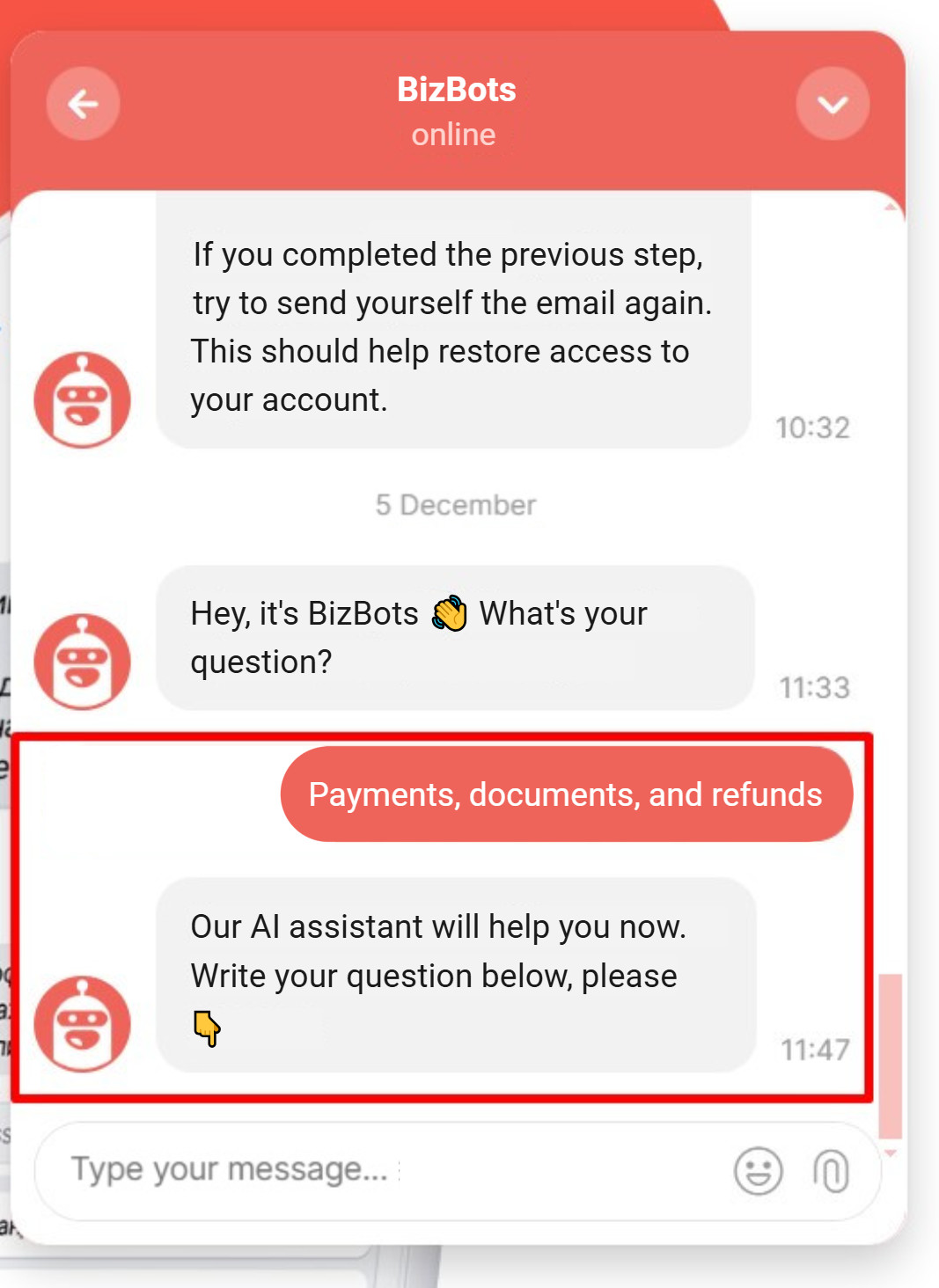
Here’s an AI agent handling specific FAQs related to payments and docs:
Example 3: Intelligent escalation routing
Problem. A five-person CS team manually reads every ticket to decide which agent handles it. Misrouted tickets get bounced two or three times before reaching the right person. Each bounce adds 20 to 30 minutes to resolution time.
Mechanism. Workflow automation tags each incoming ticket by topic (technical, billing, onboarding, account management) and assigns it to the correct agent queue automatically. The AI agent handles Tier-1 within each category before the ticket reaches a human, and passes the full context, including category, conversation, account data, and suggested priority, when escalation is needed.
Outcome. Resolution time drops by 52%, consistent with industry benchmarks for automated routing deployments. The team handles the same volume with fewer escalations and less context-switching between agents.
For more use cases across industries, see automated customer service examples from real deployments.
5 metrics to track after automating customer service
Track five metrics after automating customer service: deflection rate (target 60 to 70% for AI agents), first response time (under five minutes for automated responses), resolution time and rate, CSAT (watch for a three-point drop as a warning signal), and Tier-1 ticket volume trend (target 20 to 30% MoM reduction within 60 days). Automation without measurement is guesswork.
- Deflection rate. Percentage of tickets resolved by automation without human involvement. Target: 30 to 40% for Level 1 rule-based systems, 60 to 70% for Level 3 AI agents. If deflection is below 20% at 30 days, the knowledge base needs more coverage.
- First response time (FRT). Time from ticket creation to first substantive response. Benchmark: under five minutes for automated responses, under four hours for human escalations. Rising FRT on escalated tickets usually means routing rules are too broad.
- Resolution time and resolution rate. Time from ticket creation to confirmed resolution, and the share of tickets resolved without being reopened. Benchmark: 37% faster resolution time with automation in place. If neither metric is improving, the AI is deflecting but not resolving. Check whether knowledge-base answers are complete.
- CSAT. Customer satisfaction score, post-resolution. Watch for drops in the first 30 days. A three-point or greater CSAT decline usually means customers are hitting the AI when they need a human. Review your escalation triggers.
- Tier-1 ticket volume trend. Month-over-month change in Tier-1 tickets reaching a human agent. Target: 20 to 30% MoM reduction within 60 days of deployment. Flat volume with a rising deflection rate means automation is working but new ticket types are entering the queue at the same rate.
For a deeper look at which metrics to prioritize by team size and maturity stage, see the guide to customer service KPIs for B2B SaaS teams.
Conclusion
Customer service automation works when it starts with the right input: a clear ticket audit, a knowledge base that covers the top query types, and an escalation model that keeps humans in the loop for decisions that matter.
The six steps in this guide are a sequence, not a menu. They form a customer service strategy that compounds: Step 1 (audit) feeds every downstream decision. Steps 2 and 3 (knowledge base plus AI agent) deliver the biggest deflection gains. Steps 4 and 5 (workflows plus proactive messaging) compound those gains over time. Step 6 (measurement) tells you whether the system is working or needs adjustment.
Most B2B SaaS teams see the first meaningful deflection rate improvements within 30 days of deploying an AI agent with solid knowledge-base coverage. The teams that do not see those results usually skipped the audit.
Ready to see what the six-step process looks like with your actual support queue?
FAQ
Customer service automation uses software and AI to handle routine customer interactions without a human agent touching every ticket. It ranges from rule-based FAQ bots (Level 1) to AI agents that resolve issues end-to-end (Level 3). The goal is to deflect repeatable requests so human agents focus on complex cases that require judgment.
The main benefits are faster response times (37% faster on average, per DevRev’s 2026 analysis), reduced ticket volume for human agents (60 to 70% deflection with AI agents), 24/7 coverage without added headcount, and lower cost per resolved ticket. Secondary benefits include more consistent responses and faster agent onboarding, since knowledge bases are already structured.
Common examples include AI agents handling FAQ queries in live chat, automated ticket routing by topic, self-service knowledge bases, proactive onboarding messages, and billing FAQ automation. For specific use cases from B2B SaaS deployments, see the full list of automated customer service examples on the Dashly blog.
Pros: faster response times, lower cost per ticket, 24/7 availability, and consistent answers to routine queries. Cons: rule-based bots fail outside their script, poorly configured AI frustrates customers on complex issues, and the system requires ongoing knowledge-base maintenance. The fix is a tiered model: automate Tier-1, keep humans for Tier-2 and above.
The right tool depends on team size and stack. For B2B SaaS teams of 3 to 15 people, Dashly’s AI support agent handles Tier-1 resolution with configurable escalation triggers. For mid-market teams, Intercom Fin offers strong AI with a workflow builder. For enterprise environments, Zendesk provides deeper ticketing infrastructure. For a full comparison, see the Dashly guide to best AI customer support tools.
Rule-based chatbots follow a fixed decision tree. They answer predefined questions and fail outside their script. AI agents understand natural language, pull from a knowledge base dynamically, take actions such as looking up account data or updating records, and escalate with full context when they cannot resolve an issue. Level 1 chatbots deflect under 10% of tickets; Level 3 AI agents deflect 60 to 70%.
A basic setup (knowledge base plus a rule-based FAQ bot) takes one to two weeks. A full AI agent deployment with routing rules and integrations typically takes three to five weeks. The first meaningful deflection rate improvements appear within 30 days of going live, assuming knowledge-base coverage is solid from the start.




![Customer service automation examples: 13 real workflows [2026]](https://www.dashly.io/blog/wp-content/uploads/2025/05/cusotmer-automation-examples-720x317.png)