Conversational AI for customer service: complete guide for B2B teams in 2026
 16 minutes
 19.06.2026
Customer service teams at mid-market B2B SaaS companies field the same 30 questions every day. Password resets. Billing inquiries. Feature how-tos. The volume is predictable, the phrasing is variable, and the cost is real. According to Salesforce’s 2025 State of Service report, 88% of service professionals say customer expectations are getting higher.
Conversational AI closes the gap between that expectation and what a human team can realistically deliver.
This guide covers what conversational AI for customer service actually is, how it works technically, what it delivers in measurable terms for B2B SaaS support teams, and how to implement it without the typical deployment failures. The audience here is CX and product leaders who need to evaluate the technology honestly, not buy a pitch.
What is conversational AI for customer service?
Conversational AI for customer service (also called conversational customer support) is software that uses natural language processing (NLP) and machine learning to understand customer messages regardless of phrasing, and respond in a way that resolves or routes the request.
Unlike rule-based chatbots that match keywords to pre-written answers, conversational AI understands intent, handles unexpected phrasings, and maintains context across a multi-turn exchange. The technology covers chatbots, virtual assistants, voice agents, and hybrid systems that hand off to humans when confidence drops below a threshold.
Conversational AI differs from a rule-based chatbot in one critical way: it maps intent, not keywords. A customer asking “where’s my stuff?” and “can you track my order?” both resolve to the same intent and get the same answer. A keyword bot fails on the first phrasing.
The core components: natural language understanding (NLU) parses what the customer means, a dialog management layer decides what to do next, and natural language generation (NLG) produces the response. Add a knowledge base and CRM connection and the full loop closes.
Conversational AI vs. traditional chatbots
For teams evaluating both options, the functional gap matters more than the price difference. Customer service chatbots built on keyword rules work well for narrow, predictable query sets. Conversational AI scales across variable phrasing without the scripting overhead.
| Rule-based chatbot | Conversational AI | |
|---|---|---|
| Query handling | Keyword matching | Intent recognition |
| Context | No memory between turns | Maintains multi-turn context |
| Unexpected input | Returns “I didn’t understand” | Clarifies or escalates gracefully |
| Languages | Pre-translated scripts | Native multilingual NLU |
| Improvement | Manual scripting | Learns from conversation data |
How conversational AI works in customer service
Conversational AI processes a customer message through six distinct stages before a response appears. Understanding the mechanism is what makes implementation decisions defensible, whether you’re choosing a platform, scoping a pilot, or making the case to engineering leadership.
- Input reception. The system receives text or voice. For voice channels, an automatic speech recognition (ASR) layer converts speech to text before NLU processing begins.
- Intent recognition. The NLU engine classifies the user intent behind the customer’s message. “I can’t log in” and “my password isn’t working” both resolve to intent: account_access_issue.
- Context management. The dialog engine holds what has been said so far, so a follow-up like “what about on mobile?” connects correctly to the prior exchange without requiring the customer to re-explain.
- Knowledge base and CRM lookup. The system queries connected data sources, including knowledge base articles for frequently asked questions, CRM records, and order systems, to personalize the response to the specific account.
- Response generation. The NLG layer produces the response. Template-based systems fill slots from a knowledge base. LLM-based and generative AI systems compose more naturally but require guardrails to prevent inaccurate completions.
- Escalation decision. A confidence threshold determines whether to resolve autonomously or hand off to a human agent, with full conversation context transferred rather than a cold handoff.
The role of machine learning in continuous improvement
The system improves with every interaction it processes. When human agents override an AI decision, correcting an intent classification or handling a misrouted ticket, those corrections feed back into the training loop. A conversational AI deployment at 12 months handles a significantly broader range of query types than at launch, without manual scripting, because the model has been trained on real phrasing patterns from actual customer conversations.
This matters for support leaders calculating long-term ROI. The deflection rate at month 3 is not the deflection rate at month 12. The system compounds.
7 benefits of conversational AI for customer service
The advantages of conversational AI for B2B customer service come down to seven measurable outcomes. Each follows the same structure: what changes for the customer or the team, the mechanism that drives it, and what the evidence shows.
1. 24/7 coverage without shift cost
Customers in different time zones stop waiting until 9am Monday. The AI layer handles first contact autonomously, answering, routing, or triaging, with no shift constraints. For B2B SaaS teams supporting customers across North America and Europe, this removes the dead-hour coverage gap that drives churn without requiring a follow-the-sun hiring model.
2. Response time drops below one second
A customer sending a support message gets an immediate acknowledgment and, for resolvable queries, an answer. The average first-response time across customer service teams is over 12 hours, according to SuperOffice’s customer service benchmark study. Conversational AI eliminates that wait on every automated contact.
3. Ticket deflection: 30 to 40% fewer tickets reach agents
Conversational AI resolves the automatable share of inbound volume without a human agent. Analysis of AI deflection rates across support teams shows that AI-assisted resolution deflects between 20 and 40% of contacts on average, with top performers exceeding 80%. For a team handling 2,000 tickets a month at an average $10 to $16 per chat-resolved ticket, a 30% deflection rate removes $6,000 to $9,600 in monthly operating cost without reducing service quality.
Dashly’s AI support agent handles first-response and ticket routing before a request reaches the human queue, cutting average first-response time while keeping context intact for the handoff.
4. Consistent quality across every interaction
An AI agent doesn’t have a bad day. It applies the same tone, process, and knowledge base whether it’s ticket 1 or ticket 200. For B2B teams where a single support interaction can influence a renewal decision, consistency is a retention lever, not just an operational metric.
5. Multilingual support without additional headcount
One deployment handles queries in English, German, Spanish, and French without separate teams or translated scripts. The NLU model resolves intent in each language independently. For SaaS companies expanding into new markets, this removes the constraint of “we can’t support that region until we hire.”
6. CSAT improvement of 10 to 15 percentage points
Salesforce’s 2025 State of Service report shows that teams using AI-powered service tools report measurably higher CSAT scores, driven by faster response and more consistent resolution quality. The CSAT gain is a lagging indicator. It typically shows within 90 days of a well-configured deployment, not at go-live.
7. Cost-per-contact reduction of 20 to 30%
Every ticket the AI resolves without an agent is a ticket at the AI’s cost per interaction, not the human agent’s. Gartner research projects that AI will cut contact center labor costs by $80 billion by 2026, with early adopters already seeing 20 to 30% reductions in cost-per-contact.
Real-world use cases of conversational AI in customer service
Conversational AI in customer service covers five distinct operational scenarios, each with its own ROI logic: first-response automation, self-service FAQ deflection, contact center IVR replacement, proactive trigger-based outreach, and post-sale success check-ins. The right starting point depends on where your team’s highest-cost, highest-frequency friction sits.
First-response automation and ticket routing
The AI handles inbound contact immediately: classifying the request type, checking available context such as account status, plan tier, and recent ticket history, then either resolving or routing to the right agent. This is the highest-impact use case for teams with volume above 500 tickets per month.
Here’s how the AI agent supports users:
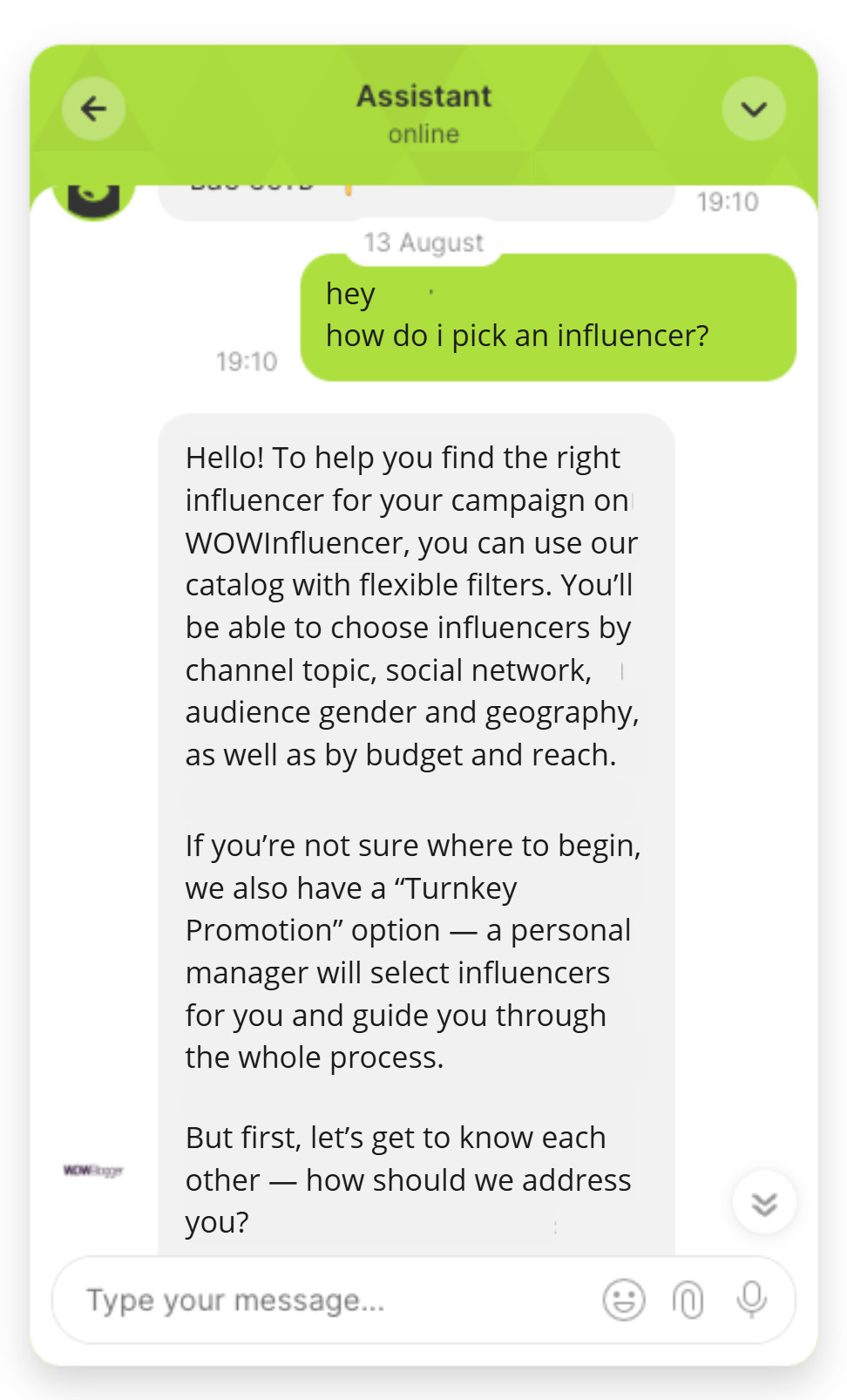
See automated customer service examples from B2B SaaS teams who cut first-response time from hours to under 60 seconds without adding headcount.
Self-service FAQ deflection
Most B2B support queues have a core set of 30 to 50 query types that account for the majority of total volume: password resets, billing questions, feature how-tos, plan upgrade paths. Conversational AI handles all of these without a human agent. The system pulls from the knowledge base, presents the answer, confirms resolution, and closes the ticket.
Here’s an AI agent handling specific FAQs related to payments:
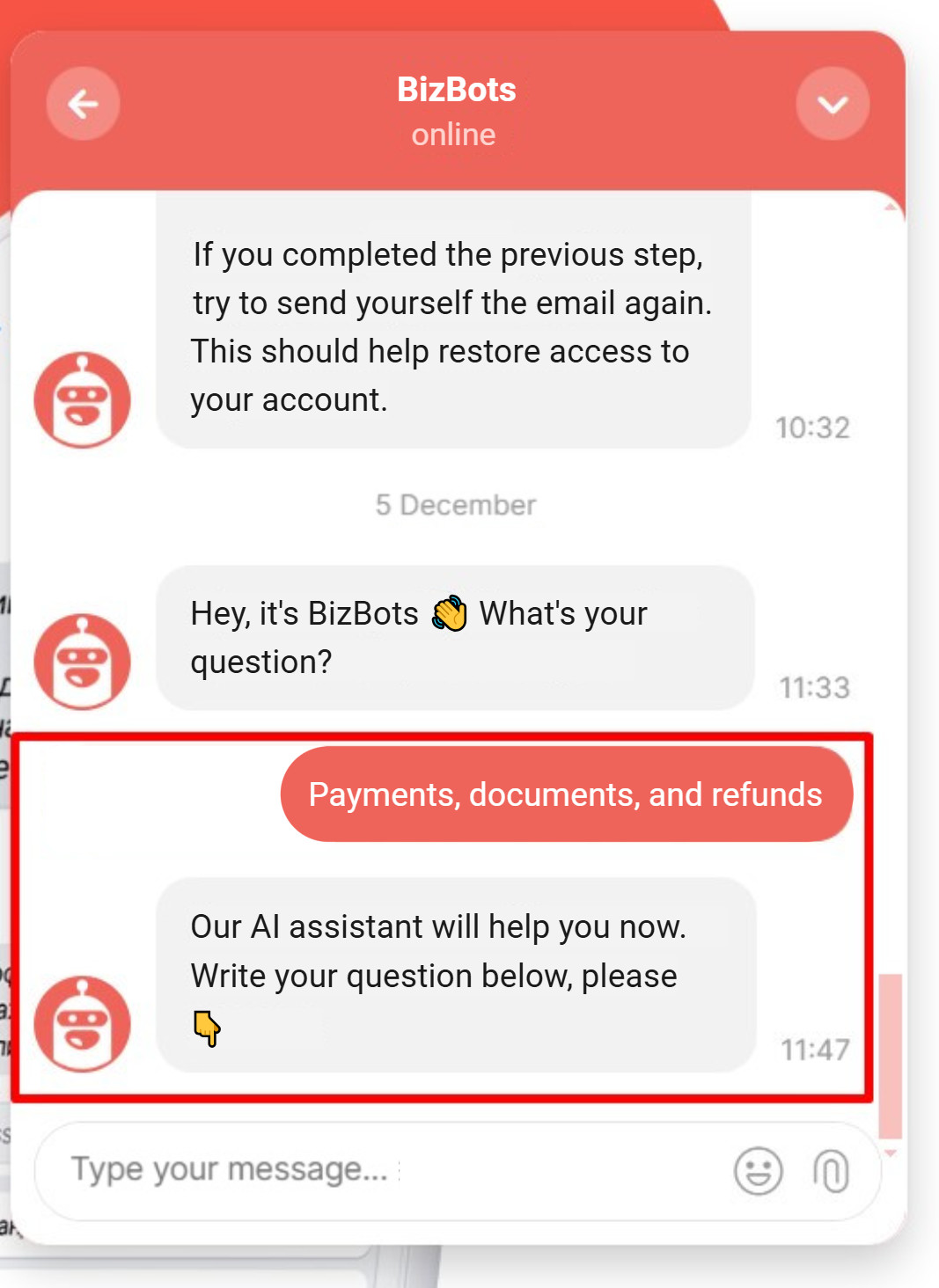
The economics here are linear. Every percentage point of deflection rate is a direct cost reduction on the human agent team, with no degradation in resolution quality on routine queries.
Contact center IVR replacement
Conversational AI in the contact center replaces interactive voice response (IVR) menus entirely for teams with phone support channels. Instead of “press 1 for billing, press 2 for technical support,” a caller describes their issue in natural language and gets routed, or resolved, without navigating a menu tree. The NLU layer processes spoken language with the same intent-recognition accuracy as text, and escalates with the full call transcript attached.
Proactive outreach and re-engagement
Conversational AI doesn’t only respond. It initiates. Trigger-based rules fire outreach when behavioral signals indicate a support need before the customer submits a ticket: a user who hasn’t completed onboarding step 3, an account with a failed payment pending, a customer who logged in three times in the past hour without completing a key action.
This is where support connects to conversational marketing: proactive, contextual reach-outs that reduce escalation volume by addressing friction before it becomes a ticket.
Post-sale customer success check-ins
For B2B SaaS, the highest-value conversational AI use case is often invisible in standard CS metrics. Automated QBR prompts, health score check-ins, and upsell trigger messages sent when a customer hits a usage threshold don’t show up in ticket deflection numbers. They show up in net revenue retention.
A customer who receives a proactive “you’ve hit your plan limit, here’s what’s included in the next tier” message at the right moment is significantly more likely to upgrade than one who discovers the limit by hitting an error wall.
Key features to look for in a conversational AI platform
Seven capabilities separate effective conversational AI platforms from underperformers. Evaluate each against your existing stack before committing to a vendor.
- Intent recognition accuracy above 90%
- Native CRM integration
- Structured human handoff with full context transfer
- Native multilingual NLU
- Real-time analytics dashboards
- A self-improving training pipeline
- Enterprise-grade data residency controls
Intent recognition accuracy
Request a live benchmark on your own conversation logs, not the vendor’s demo dataset. A well-trained model should hit above 90% intent classification accuracy within the first 60 days on the query types it was trained on.
CRM and help desk integrations
Native connectors to Salesforce, HubSpot, Zendesk, or Intercom matter more than an API-in-theory. A connection requiring a developer to maintain breaks during team transitions and during platform upgrades. Without native integration, personalization is impossible: the system cannot differentiate a trial-tier account from enterprise, which affects every routing and response decision.
Human handoff protocol
Cold handoff, where the agent receives no context from the AI conversation, is worse than no AI at all. The handoff must include: the full conversation transcript, detected intent, customer account context pulled from CRM, and suggested resolution steps. Anything less creates a double-contact for the customer.
Multilingual NLU
Not translation. NLU trained natively in each language, not translated from English and back. The quality difference is measurable in intent recognition accuracy on non-English queries.
Analytics dashboard
Real-time omnichannel dashboards track: resolution rate by intent category, deflection rate, CSAT per channel, escalation rate, sentiment analysis trends, and intent confidence distribution. Without these metrics, you cannot improve the system after launch or build a renewal case for the platform cost.
Training and retraining pipeline
How does the model update? Manual scripting only, or does it ingest corrections from agent overrides? The latter is three to five times faster to improve and doesn’t require dedicated ML engineering time.
Data residency and security
For B2B SaaS teams handling customer account data, confirm the platform complies with your data processing agreements. EU customer data processed on US-only infrastructure creates compliance exposure that surfaces at the worst possible time: enterprise renewal.
How to implement conversational AI for customer service: 5 steps
Implementation failures in conversational AI almost always trace to the same root cause: deploying before scoping. The five steps below sequence the work in the order that prevents the most common mistakes.
Step 1: Audit your top 50 inbound request types. Pull 90 days of ticket data. Rank request types by volume multiplied by average handle time. This produces the deflection opportunity map, the queries where automation has the highest ROI per dollar of implementation cost. Without this map, teams automate what’s easy, not what’s expensive.
Step 2: Define the automation scope explicitly. Not every query should be automated. Write down exactly what the AI resolves autonomously, what it handles with agent-assist, and what bypasses the AI entirely. Billing disputes, legal escalations, and custom enterprise contract questions belong in the third category. Getting this wrong is what creates the negative experiences that kill internal support for the technology after the pilot.
Step 3: Choose a platform with native CRM integration. The AI’s value multiplies when it reads account context before responding. A customer on a trial plan asking about a feature asks a different question than the same customer on an enterprise plan. See how customer service automation connects to your existing stack before committing to a platform vendor.
Step 4: Build your intent library from real conversation logs. Train on what customers actually ask, not what someone thinks they ask. The top 50 query types from Step 1 become the starting intent library. Each intent needs 15 to 20 example phrasings sourced from real messages, not copywriter variations. Variation in the training data directly determines accuracy on real traffic.
Step 5: Run a 2-week pilot on 20% of inbound traffic. A defined query category, not the full queue. Four metrics: deflection rate, CSAT delta, escalation rate, false-positive classifications. Two weeks of data is the decision gate: expand, adjust, or stop.
Ready to structure your pilot: walk me through it
Best conversational AI tools for customer service in 2026
The AI customer support tools market has matured. Choosing the right conversational support software requires consistent evaluation against these seven criteria. Vendor marketing claims tend to converge; actual performance on your traffic profile doesn’t. The platforms below are the ones B2B SaaS teams are actually deploying in 2026.
| Platform | Best for | Key strength | Key limitation |
|---|---|---|---|
| Dashly | B2B SaaS and real estate inbound | Handles user’s questions based on inner docs, routes support, works together with Qualifier Agent and can catch leads | Focused on inbound; not built for outbound mass-contact flows |
| Intercom (Fin AI) | PLG and product-led teams | Native to Intercom messenger; strong article deflection | Cost scales steeply with contact volume |
| Salesforce Einstein | Enterprise CRM-native teams | Deep Salesforce data access for personalization | Complex setup; requires existing Salesforce investment |
| Ada | E-commerce and consumer SaaS | Fast no-code setup; strong multilingual support | Lighter CRM integration depth for B2B use cases |
| NICE CXone | Contact center voice teams | IVR replacement; voice AI at enterprise scale | Enterprise pricing; substantial overkill for sub-500-agent teams |
For B2B SaaS and real estate teams, Dashly operates as an AI Inbound Revenue Agent: qualifying inbound leads, routing support tickets, and booking demos autonomously. The distinction from standard conversational AI tools built for deflection alone is that Dashly closes the loop between first contact and pipeline. For teams where the same accounts appear in both support and sales, that integration changes the economics significantly.
Conversational AI vs. outsourcing customer service: when each makes sense
The choice between conversational AI and outsourced support isn’t binary. Most B2B SaaS teams at scale run both. The question is which handles which query category, and how the economics of each compare on your specific ticket mix.
| Conversational AI | Outsourced support | |
|---|---|---|
| 24/7 coverage | Yes, no shift cost | Higher cost; shift scheduling required |
| Complex, escalated queries | Limited; escalates to human | Yes, if agents are well-trained |
| Upfront cost | Medium (platform + training) | Low (pay-per-contact) |
| Scalability | Instant, linear cost | Hiring and ramp time required |
| Data privacy control | High; data stays in your stack | Depends on vendor DPA terms |
| Improvement rate | Continuous; learns from traffic | Dependent on SOP and training cycles |
The practical model for B2B SaaS at 1,000 or more monthly tickets: conversational AI on first contact, qualification, and resolvable queries; specialized outsourced agents for complex technical escalations and account management conversations. Neither competes with the other on the same query types. The failure mode is deploying conversational AI on complex queries it cannot reliably resolve.
Conclusion
Conversational AI in customer service removes repetitive first contact from the agent queue, freeing the team for complex, high-stakes conversations that influence renewal and expansion.
For B2B SaaS teams, the three clearest value drivers are ticket deflection that reduces cost-per-contact, instant response that closes the expectation gap on async channels, and proactive outreach that surfaces customer friction before it becomes a churn signal.
Implementation starts with an audit of your top 50 inbound query types, a clear automation scope, and a two-week pilot before full deployment. The teams that fail deploy too broadly too fast. The ones that succeed treat the first deployment as a scoped experiment with explicit success metrics and a documented escalation boundary.
The technology is mature. The implementation discipline is where most of the work is.
FAQs
A rule-based chatbot matches keywords to pre-scripted answers and breaks when a customer phrases something unexpectedly. Conversational AI uses natural language understanding to recognize intent regardless of phrasing, maintains context across multiple turns, and escalates gracefully when confidence drops below a threshold, rather than returning a generic error message.
The measurable benefits in B2B SaaS contexts are: ticket deflection of 30 to 40% of queries resolved without agent involvement, first-response time below one second, CSAT improvement of 10 to 15 percentage points within 90 days, and 20 to 30% reduction in cost-per-contact. Benefits compound after the first 60 to 90 days as the model improves on real traffic.
Platform pricing ranges from $50 per month for basic deployments with limited integrations to $500 or more per month for enterprise-tier with CRM integration and custom NLU training. Total cost of ownership includes four to eight weeks of implementation and ongoing model maintenance. Calculate against your current cost-per-ticket and target deflection rate to size the return.
Not all of them, and it should not try. Conversational AI handles structured, resolvable queries reliably: account questions, feature how-tos, billing inquiries, access issues. For complex technical escalations, custom contract discussions, or emotionally sensitive situations, it should escalate to a human agent with full context transferred. Attempting to automate these cases is the most common implementation mistake.
Yes, with the right scope. B2B support queues typically have higher average ticket complexity than B2C, but they also have more structured query patterns: the same set of questions from the same account types, repeatedly. That structure is exactly what conversational AI trains well on. The key is defining clearly which query types get automated and ensuring the handoff context is rich enough for agents handling escalations.
In a contact center context, conversational AI replaces IVR menus entirely. Instead of press-1/press-2 navigation, callers describe their issue in natural language. The AI classifies the intent, resolves if possible, or routes to the right agent queue with the full call transcript attached. It also powers agent-assist: real-time resolution suggestions displayed to the agent during a live call.
ROI calculation: deflected tickets multiplied by cost-per-ticket, plus CSAT-linked retention value, minus platform and implementation cost. At a 30% deflection rate on 2,000 monthly tickets with a $15 average cost-per-ticket, the gross monthly saving is $9,000. Add CSAT-linked renewal improvement and the payback period on most mid-market deployments is under four months.
Modern platforms increasingly incorporate generative AI models to produce responses. Unlike template-based systems that fill pre-written slots, generative AI composes answers contextually, improving quality on novel queries. The tradeoff is accuracy risk on factual account data, which is why guardrails and human review thresholds remain important even as the underlying models improve.
Yes. Omnichannel deployment is a standard expectation for enterprise-grade conversational AI. A well-configured platform handles the same customer interaction across live chat, email, SMS, and voice with shared conversation context, so a customer who starts in chat and follows up by phone is not treated as a new contact and does not repeat their issue.