New AI support agent: 1.9x more questions closed without a human
 8 minutes
 04.11.2026
Open your support queue on any Monday and you’ll find the same questions near the top. Where’s the invoice? How do I add a teammate? The answers sit in the help center. Someone still types the answers out or pastes the article link, many times a day.
Customers feel the same loop from the other side. They write in, get a line saying a person will reply, and wait. Evenings and weekends are worse. When a human agent finally picks up, the customer retells the whole problem from the start. The setup sends every question to a person, simple or not.
An AI support agent can take the repeatable questions off that queue and answer them in seconds, in the same chat, at any hour. Human agents keep the judgment calls.
The support team at our client, a B2B SaaS company, introduced an AI support agent over 2 years ago to handle the most common queries. But recently they switched to the updated version. After the switch:
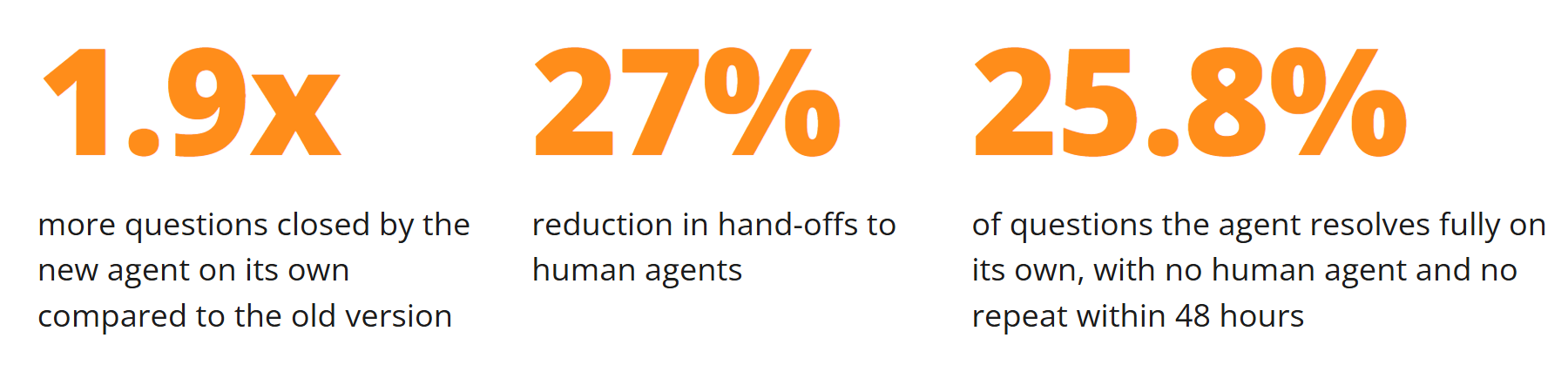
- 1.9x more questions closed by the new agent on its own compared to the old version
- 27% reduction in hand-offs to human agents
- 25.8% of questions the agent resolves fully on its own, with no human agent and no repeat within 48 hours
Who handles support, and how much
The company’s support gets about 1,500 questions a month. The website chat is the largest channel, and customers also write in Telegram and WhatsApp.
One person manages the agent: the knowledge base admin, who is also a human agent and the support lead.
How the old agent worked
The old agent ran from March 2024. It answered basic questions that the knowledge base already covered: how to configure a feature, what a term means, etc.
The old agent saw only the current message. It built one search query from that message, pulled matching passages from the knowledge base and answered from them. If the passages missed, it said it didn’t know and handed the question to a human agent. If a message contained a stop-word, the agent didn’t touch it and passed it to a human agent.
What changed in the new agent
Tasks: a workflow for each situation
A stop-word only decides whether the agent handles a question and routes it to a human. A task decides what to do: answer, clarify, collect data or hand over. Tasks are for situations that need a fixed sequence of steps.
A task is an instruction for one topic. It tells the agent what to do with a question on that topic: answer by instruction from the knowledge base first, and call a human agent only if the answer doesn’t help.
For questions about payment documents, such as receipts after a subscription payment, the agent answers by instruction and calls a human agent only if that doesn’t help.
Here is how each agent handles a request for a receipt:
Across payment documents, no question closed without a human agent in June. In October, 48% did. For reconciliation reports the share went from 0% to 83%.
Here is another task, for a problem in the account that follows a fixed algorithm.
After each check, the agent waits for the customer’s answer.
The task has steps and a way out. The human agent gets a conversation where the standard checks are already done.
It knows who is writing before the chat starts
The new agent sees context before the first message: the customer’s last conversations (five by default), user properties such as pricing plan, role and customer type, events such as pages visited and buttons clicked, and screenshots the customer sends. It asks fewer questions and answers for this customer, for example by saying a feature isn’t available on their pricing plan.
Customers come back when something wasn’t clear the first time. The new agent sees their earlier conversations, so it can resolve the problem on the second question.
The agent didn’t ask which mailings were blocked or why. The Tuesday conversation was already there, so it went straight to the unblock steps.
It searches the knowledge base itself
The old setup searched once, from the first message. The new agent writes its own query from the whole context. If the customer says “that’s not it”, it rephrases and searches again, up to a number of attempts set in the rules. If the knowledge base has nothing, it hands over at once instead of repeating empty searches.
It covers the night shift
Th support stops working at 7 PM, but customer queries keep coming. Outside working hours the agent takes a conversation from the first message to the end. A human agent joins in the morning if the question needs one. It answers what the knowledge base covers. When a question needs a person, it says so, mentions the human agent in the chat, and keeps helping with the basics until the workday starts.
The customer wasn’t left waiting in silence. The agent answered the part it could handle, said what happens next, and collected the figure the human agent needs. In the morning the human agent opens the chat with all of it already there.
Results
For the company’s customers, the change shows up in the first reply. Questions about payment documents, reconciliation reports and blocked mailings used to get one line saying a human agent would reply.
Human agents now start from conversations where the standard checks are done and the history is in the chat.