Automated lead generation: How to build a system that captures, qualifies, and routes leads 24/7
 17 minutes
 12.05.2026
A lead fills out your pricing form at 10pm on a Tuesday. They’re evaluating three tools. By 9am Wednesday, when your SDR opens their inbox and starts working the queue, that lead has already been on a call with your competitor and is halfway through a trial signup.
It’s a systems problem. The lead arrived in a system that required someone to be awake, to notice, to prioritize, and to respond. All three of your competitors had the same problem. One of them fixed it.
The fix is an automated lead generation system: a connected set of tools and logic that captures a lead, qualifies them, routes them to the right next step, and either books a meeting or starts a nurture sequence without waiting for a human to push it forward.
This article covers:
- What that system looks like;
- What its five components are;
- Which tools you need;
- How to build it step by step.
We’ll also show a real example of a B2B SaaS company that cut response time from 4+ hours to under 30 seconds and lifted conversion to meeting from 12% to 28%.
What is automated lead generation?
Automated lead generation is the use of software to capture, qualify, and route inbound leads without manual steps between those stages. A visitor arrives, takes an action (fills a form, starts a chat, downloads a guide), and the system handles everything that used to require a human to check a queue and make decisions.
Specifically, automation handles:
- First response (instant message or email confirmation, no waiting)
- Lead qualification (asking questions, scoring behavior, filtering by firmographic criteria)
- CRM entry (contact created, fields populated, deal stage set)
- Meeting booking (calendar link shown or booking completed inside the chat)
- Nurture sequences (behavior-triggered emails, not scheduled blasts)
What automation doesn’t replace: defining your ICP, setting qualification criteria, and having actual sales conversations. Those require human judgment. Automation enforces whatever criteria you define, at every hour, for every lead, consistently.
This article focuses entirely on inbound lead generation: leads who come to you. If you want to compare the two approaches, see our breakdown of inbound vs outbound lead generation. Outbound automation (sequences, scraping LinkedIn, cold email) follows different logic and has different compliance considerations.
The core principle behind automated lead generation is simple: every manual handoff is a gap where leads go cold. The lead generation process runs on contact information that expires fast. Your target audience is evaluating options in parallel. Marketing automation exists to close those gaps before a human has to notice they’re open.
Why manual lead generation breaks at scale
Manual lead generation doesn’t fail because teams are lazy. It fails because it depends on humans doing repetitive, time-sensitive tasks with perfect consistency. That works at 20 leads a month. It breaks at 200.
Speed-to-lead failure. Harvard Business Review research found that companies responding to inbound leads within 1 hour are 7x more likely to have a meaningful conversation with a decision-maker than those who wait even 2 hours. Most B2B SaaS teams respond in 4 to 24 hours. By then, the lead has moved on, cooled off, or signed up with someone else.
Qualification inconsistency. Ask three SDRs what counts as a qualified lead and you’ll get three different answers. Some ask about budget. Some ask about team size. Some just book everyone who fills a form. The result is a CRM full of contacts at different qualification stages, with no consistent field data, and pipeline numbers you can’t trust.
Linear scaling problem. If you triple your inbound traffic, manual lead handling requires roughly three times the headcount. Automation breaks that relationship. The same system handles 30 leads and 3,000 leads. You add people to handle conversations that need judgment, not to push leads through a queue.
The numbers behind this are clear:
Nucleus Research found that marketing automation delivers a 12.2x ROI on average across B2B organizations that fully implement it.
Salesforce reports that automated emails generate 199% higher click-through rates than manually sent broadcast emails.
A Tidio study found that 62% of consumers prefer interacting with a chatbot over waiting for a human agent when they have a quick question.
The underlying issue is structural: manual processes introduce variability at exactly the moments where speed and consistency matter most. The goal of automation isn’t to remove humans from sales. It’s to remove humans from the parts that don’t require them.
The 5 components of an automated lead generation system
Most teams think about “marketing automation” as a single tool. In practice, an automated lead generation system has five distinct layers. Each layer has a specific job. If one layer is missing, the whole system leaks.
1. Lead capture
Lead capture is the first point of contact between your system and a potential customer. Most teams rely on a single form on a “Contact us” page. That’s the low-conversion path.
High-performing inbound systems layer multiple capture mechanisms:
- Chatbot on pricing and demo pages. Visitors on these pages have already self-selected as interested. An AI scenarios for lead generation that triggers after 30–45 seconds on these pages catches visitors who won’t fill a form but will answer one question in a chat widget.
- Lead forms with instant auto-confirmation. The confirmation email keeps the lead warm and sets expectations. If your form submit takes 24 hours to acknowledge, you’ve already lost momentum.
- Exit-intent triggers. When a visitor moves their cursor toward the browser bar or back button, a targeted message can recover 10–15% of exits on high-intent pages.
- Content upgrades. Gated assets (calculators, benchmarks, playbooks) on blog posts turn readers into identifiable contacts. The lead captures themselves in exchange for something useful.
The goal at this layer: collect enough contact information to run qualification logic. Usually that means email, company, and one or two firmographic signals. You don’t need to ask everything here.
Here’s an example of an engagement message based on user activity:
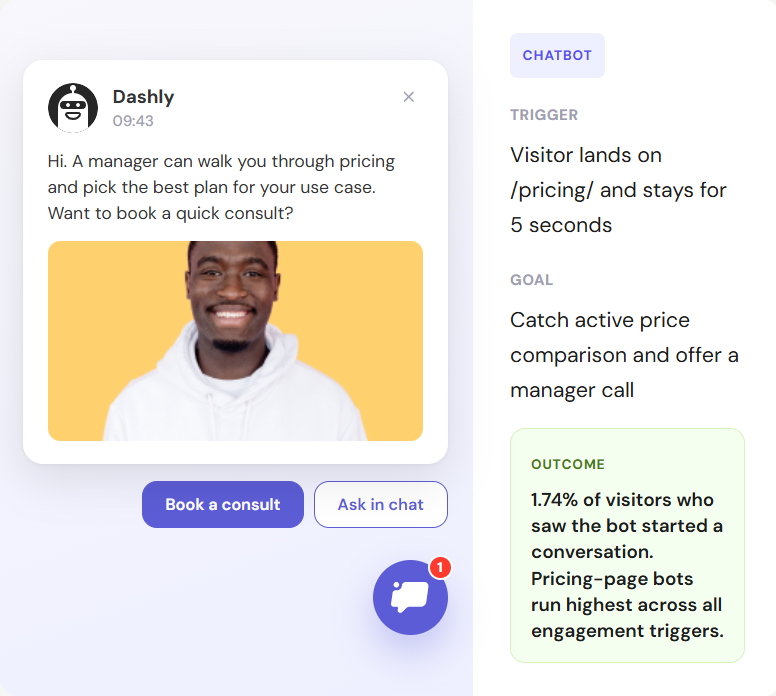
Conversion rate on the capture layer is the first metric to optimize. If your pricing-page chatbot gets 15 opens and 2 completions, the problem isn’t your qualification logic. It’s the chat copy or trigger timing.
2. Lead qualification
Qualification is where most systems are either too aggressive (every lead gets a meeting invite) or too passive (leads sit in a list waiting for a human to score them).
There are two mechanisms that work well together:
AI agent qualification flows. An agent asks 3–5 targeted questions: use case, company size, current solution, timeline. The answers map to qualification criteria you define. An ICP match triggers the next step automatically. A non-match goes to nurture. This is the fastest form of lead qualification because it happens in real time, during the same session the visitor is already engaged.
AI-driven qualification is a big upgrade over traditional chatbots: natural language understanding can handle open-ended answers, detect buying signals in free-text fields, and flag edge cases for human review.
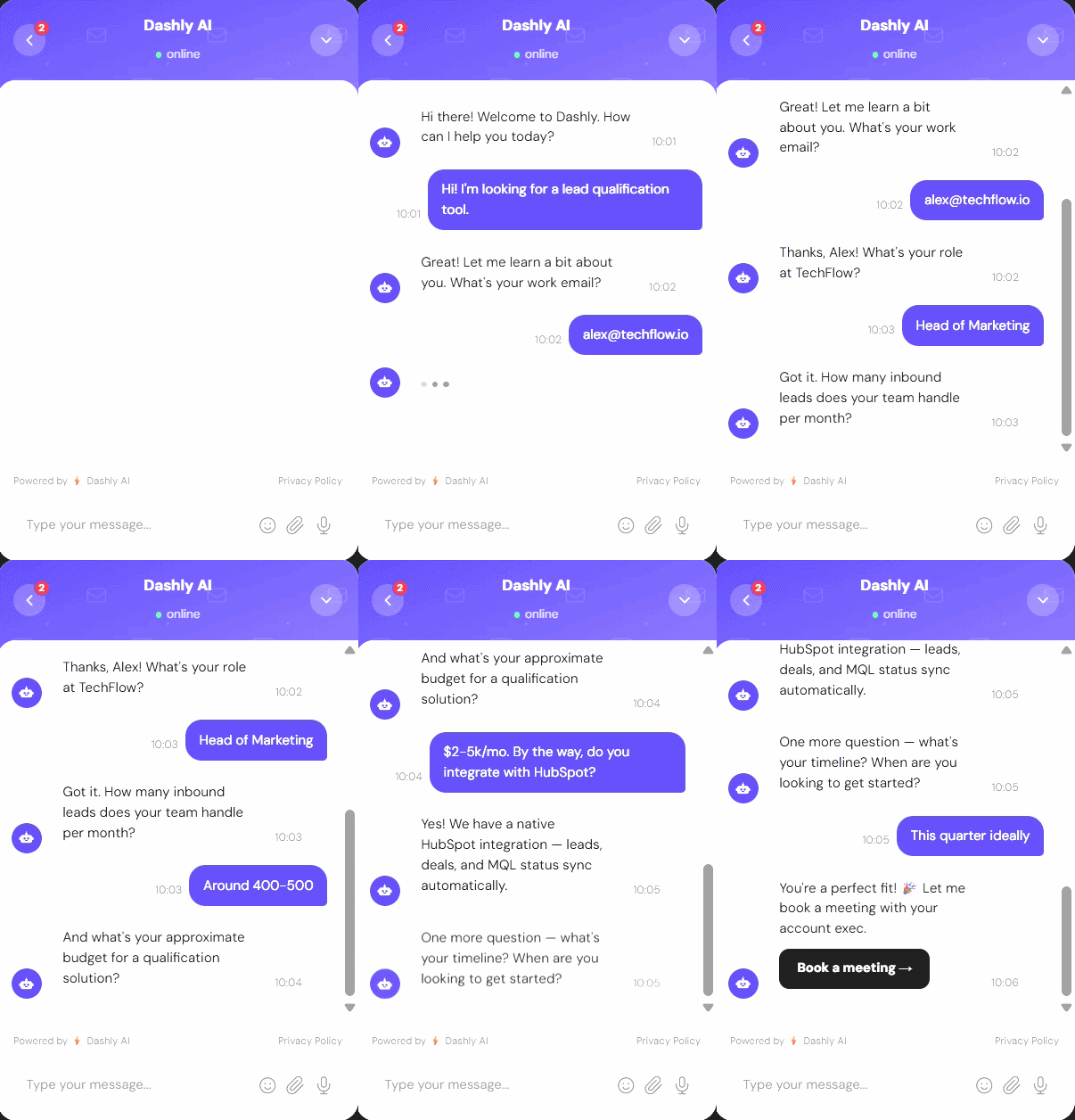
Lead scoring. Lead scoring combines behavioral signals (pages visited, number of sessions, pricing page visits, feature page engagement) with firmographic data (company size, industry, job title) to produce a composite score. Leads above a threshold get routed to sales. Leads below a threshold go to nurture. The scoring model replaces the SDR judgment call that happens differently every time.
Key term to understand here: AI lead generation refers to using language models to interpret lead intent and automate the qualification decision, not just collect form data.
3. Lead routing
This is where most systems break. Qualified lead arrives. Score is above threshold. CRM creates a task. SDR sees it sometime between now and end of day. That gap kills conversion.
Automated routing closes that gap entirely:
- Automatic CRM entry. Contact created, fields populated, source tagged, deal created, all without human input. No one has to log into a form submission and manually enter data.
- SDR assignment by rules. Geography, company size, industry vertical, account tier. The assignment logic runs at time of capture, not when someone gets around to reviewing the queue.
- Instant Slack or email notifications. The assigned SDR knows within seconds, not when they check their CRM dashboard.
- Calendar booking inside the chat. For ICP-fit leads, the fastest path is showing a booking link immediately after qualification. A lead who books their own meeting has no drop-off between “interested” and “on the calendar.”
- Automatic deal creation. Deal stage, expected close, deal owner, assigned at routing time based on lead data.
The routing layer is about lead management discipline: every qualified lead reaches the right person through a defined path in the inbound sales process, not through a notification someone might see. The CRM reflects reality in real time, not at the end of someone’s workday.
4. Lead nurturing
Not every inbound lead is ready to buy this month. A lead nurturing system keeps your company present and credible for leads who opted in but aren’t ICP-ready yet, or who need more time in the decision process.
The critical distinction: nurture sequences should be behavior-triggered, not scheduled blasts.
Three tracks that cover most B2B SaaS scenarios:
- ICP-ready, not booked. Qualified but didn’t book a meeting. Short sequence: 3 emails, 2–3 day spacing, each offering a different reason to book (case study, ROI calculator, direct invite).
- ICP, but not ready now. Right company, wrong timing. Longer nurture: 5–7 emails over 3–4 weeks, focused on education and social proof. Goal is to be the obvious choice when timing changes.
- Adjacent ICP. Interested but doesn’t match core criteria. Lower frequency, higher education-to-sales ratio. These leads sometimes convert 90 days later when their situation changes.
See our full guide on inbound marketing funnel for more best practices and working strategies. The core principle: email automation sends the right message based on what a lead has done, not based on a calendar. Email campaigns built on behavior outperform broadcast schedules consistently because they arrive when context is relevant.
Lead nurturing is about timing and relevance. Three well-targeted emails outperform ten generic ones.
5. Analytics
Without measurement, you’re optimizing blind. The five metrics that matter for an automated lead generation system:
- Capture rate. What percentage of pricing/demo page visitors start a chat or fill a form? Low capture rate means the trigger timing, copy, or offer needs work, not the qualification logic.
- Qualification rate. Of leads captured, what percentage meet ICP criteria? If this is below 20%, your traffic is off-target. If it’s above 80%, your criteria might be too loose.
- Conversion to meeting. Of ICP-qualified leads, what percentage book a call? This is your primary sales funnel metric. Under 20% usually means booking friction is too high or routing is too slow.
- Time to first response. How long between lead capture and first meaningful contact? Track this for automated responses (should be under 60 seconds) and human follow-up (should be under 1 hour for hot leads).
- Pipeline contribution. What percentage of your pipeline originated from the automated inbound system vs. other sources? This tells you whether to invest more in the system or diversify.
Data management at this layer means keeping your CRM clean enough that these metrics are trustworthy. Garbage-in is garbage-out: if source tracking is inconsistent, pipeline contribution numbers will be wrong. The conversion rate metrics only improve if you can accurately diagnose where leads drop off.
How to automate lead generation: step by step
Most teams try to start with tools. The right sequence starts with criteria.
Define your ICP and qualification criteria before touching any tool. Who is a qualified lead? Which company size, which job titles, which use cases? What disqualifies a lead? Write this down as explicit rules. Everything downstream depends on it. If your criteria are vague, your automation will be inconsistent, and you’ll just move the manual judgment problem from SDRs to lead scoring configuration.
Set up the lead capture layer. Install a chatbot on your pricing page and demo request page. Set it to trigger after 30–45 seconds. Write 3–4 opening messages that test different angles (pain-led, outcome-led, question-led). Add auto-confirmation to every form submit. Add exit-intent on your highest-traffic content pages. Start there, before adding capture mechanisms on lower-intent pages.
Configure qualification logic. Map your ICP criteria to chatbot questions or scoring rules. If you’re using a chatbot flow, design 4–5 questions that cleanly separate ICP from non-ICP in most cases. If you’re using a scoring model, assign point values to firmographic fields and behavioral events, and set a threshold. Test the threshold against the last 3 months of leads to check accuracy before going live.
Connect your CRM and configure routing rules. Integration first: leads flow from chatbot to CRM without any manual step. Then assignment logic: which SDR gets which lead, based on which rules. Add Slack or email notifications for hot leads. For ICP-qualified leads, surface a booking link immediately in the chat, before the conversation ends.
Build three nurture sequences. ICP-ready but not booked, ICP but not ready now, adjacent ICP. For each: 3–5 emails, behavior-triggered entry, 3–7 day spacing, clear exit condition (meeting booked or unsubscribe). Don’t build more tracks than you can write well. Two strong sequences beat five mediocre ones.
Measure weekly for the first 60 days and fix the biggest drop-off first. Pull the five metrics above every week. Find the step where the most leads fall out. Fix that first, then move to the next. Don’t optimize the routing logic if 60% of leads are dropping off at the capture step. One focused fix per week compounds fast.
Automated lead generation software: what you actually need
There’s no single tool that covers all five components. But you don’t need five separate tools to start. Here’s the actual stack, what each layer does, and where to find the tools:
| Category | What it does | Examples |
|---|---|---|
| Chatbot / AI agent | Capture + qualification 24/7, instant response, in-chat booking | Dashly, Intercom, Drift |
| Marketing automation | Behavioral email sequences, lead nurturing tracks | HubSpot, ActiveCampaign, Klaviyo |
| CRM | Lead storage, routing, pipeline tracking | HubSpot, Salesforce, Pipedrive |
| Lead enrichment | Adds company data (size, industry, tech stack) to captured leads | Clearbit, Clay |
| Analytics | Attribution, pipeline reporting, funnel visibility | Dashly Analytics, GA4 |
If you’re starting from scratch: chatbot + CRM + email automation covers the critical path. Add enrichment once you’ve validated your qualification logic and know which firmographic fields matter. Add advanced analytics once you have enough volume to make pipeline attribution meaningful.
For B2B SaaS specifically, the chatbot layer has the highest leverage. It’s the only component that captures and qualifies leads at the moment of highest intent (visiting your pricing page) without waiting for a human. Every other tool in the stack works better when the chatbot is doing its job.
HubSpot consolidates CRM + email automation in one platform, which reduces integration complexity at the cost of some flexibility. It’s a reasonable starting point for teams that don’t want to manage multiple vendors.
Your choice of automated B2B lead generation software should start from your existing stack. If you’re already on Salesforce, add Dashly for chatbot qualification and a marketing automation tool that integrates cleanly. If you’re starting fresh, HubSpot + Dashly covers four of the five layers.
💡 Pro tip: Before evaluating tools, map your current manual process on a whiteboard. Every human decision point is a candidate for automation. Every handoff between tools or teams is a candidate for integration. Build your tool shortlist from that map, not from feature comparison pages.
Real example: how Dashly automates inbound lead generation
Here’s a concrete example. B2B SaaS company, project management software, 10,000 monthly visitors, 3 SDRs.
Before the system: Visitor fills a demo request form. Form goes to CRM as a task. SDR reviews queue in the morning. Average follow-up time: 4+ hours. Conversion to meeting: 12%. Non-ICP calls as a percentage of total calls: 20–30%.
After (Engagement scenario + AI qualification + auto-routing):
- Chat triggers on pricing page after 45 seconds of engagement.
- AI agent asks 4 questions: use case, team size, current tool, timeline to switch.
- ICP fit: calendar booking shown inside the chat. Lead picks a time and confirms in under 2 minutes.
- Non-ICP: automatic entry into nurture sequence. First email sent within 5 minutes of conversation end.
- Average response time: under 30 seconds, any time of day.
- Conversion to meeting: 28%.
- Non-ICP calls as percentage of total: under 8%.
The process runs at 2am on a Saturday exactly the same as 2pm on a Tuesday. No queue, no delays, no one checking an inbox.
This is what Dashly’s AI Qualifier Agent does. It’s a conversational AI layer that runs your qualification criteria in real-time chat, routes leads based on the outcome, and connects directly to your CRM and calendar. You define the ICP rules. The agent enforces them consistently.
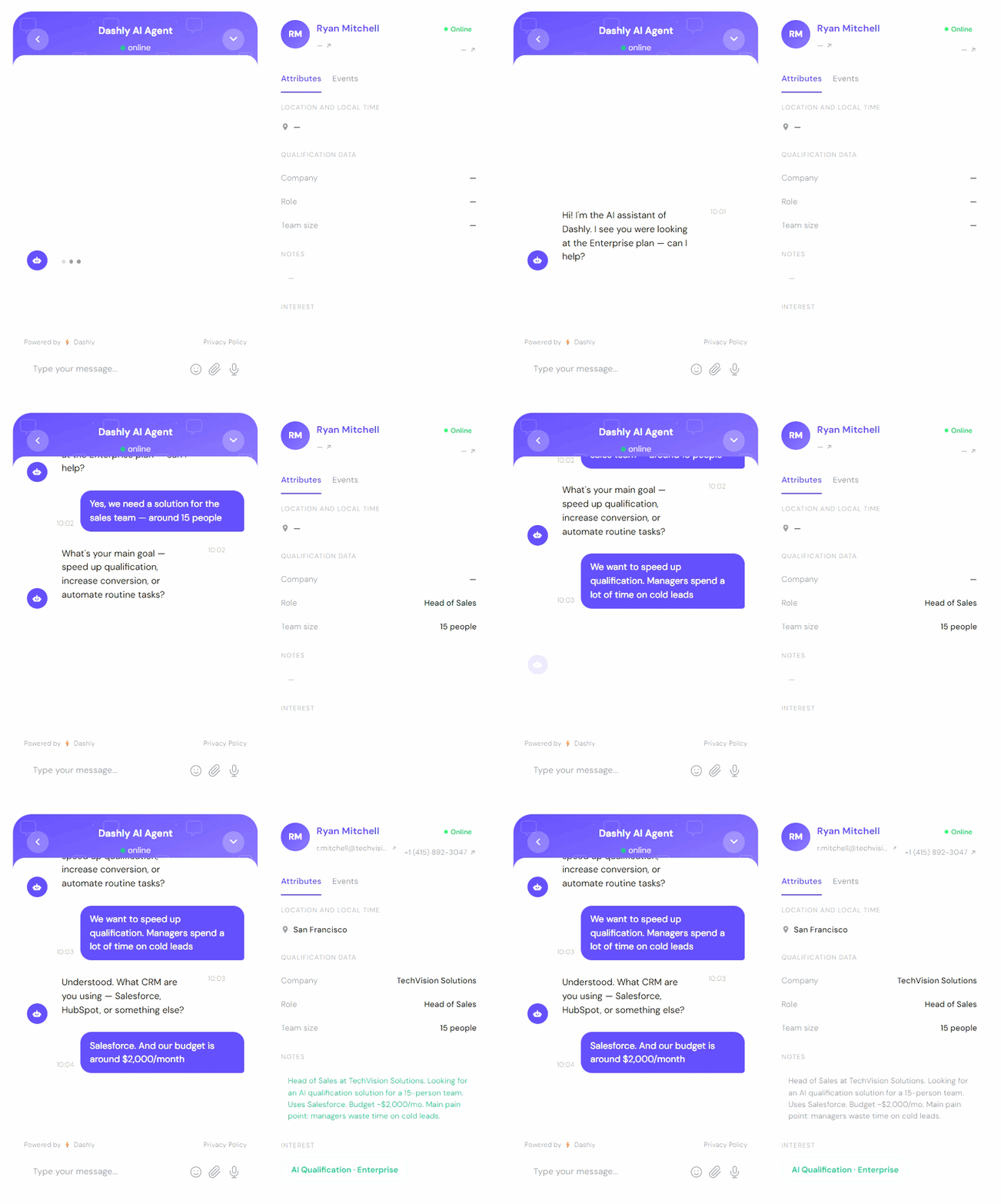
The SDRs on this team now spend their time on qualified discovery calls, not on form review and first outreach. Their close rate on meetings improved as a side effect, because the non-ICP noise was filtered out before it ever reached their calendar.
Automated lead generation FAQs
Automated lead generation is the use of software to capture, qualify, and route inbound leads without manual steps between those stages. When a visitor fills a form, starts a chat, or downloads content, the system handles the first response, qualification questions, CRM entry, and routing to either a meeting booking or a nurture sequence, all without waiting for a human to check a queue. The strategy and ICP definition still require human input. The execution runs automatically.
Start by defining your ICP and qualification criteria before touching any tool. Then set up a lead capture layer (chatbot on pricing and demo pages, forms with auto-confirmation), configure qualification logic (chatbot question flows or lead scoring rules), connect your CRM with routing rules and instant notifications, build three behavior-triggered nurture sequences, and measure weekly for the first 60 days. Fix the biggest drop-off point first, then move to the next. The full system takes 4-8 weeks to set up well, but a basic version (chatbot + CRM + one nurture track) can run in under a week.
The core stack is three tools: a chatbot or AI agent for capture and qualification, a CRM for lead storage and routing, and a marketing automation platform for nurture sequences. For B2B SaaS specifically, Dashly covers chatbot and analytics, HubSpot or Salesforce handles CRM and email, and Clearbit or Clay can enrich leads with company data. Start with chatbot plus CRM plus email. Add enrichment and advanced analytics once you have volume and validated qualification logic.
Entry-level setups (chatbot + CRM + basic email automation) typically run $200-500 per month. Mid-market configurations with lead enrichment, advanced routing, and multiple integrations run $500-2,000 per month. Enterprise setups with custom AI qualification, Salesforce integration, and dedicated support run $1,000-5,000+ per month. The ROI case is straightforward: if your average deal size is $10,000 and automated qualification converts even two additional meetings per month to closed deals, the system pays for itself in the first month.
ChatGPT and similar large language models can support lead generation tasks like drafting qualification questions, writing nurture email copy, or analyzing lead data, but they cannot run the operational layer of a lead generation system on their own. They do not trigger on website events, integrate with CRMs natively, route leads by rules, or send emails. Purpose-built tools like Dashly use AI as a component inside a system that handles capture, qualification, routing, and nurturing as connected automated steps. ChatGPT is a drafting tool. A lead generation system is an operational workflow.
Yes, inbound lead generation is legal in all major markets. The key compliance requirements depend on where your leads are located. GDPR (EU) requires a clear lawful basis for processing contact data, typically consent via opt-in forms or legitimate interest, plus the ability to delete data on request. CCPA (California) requires disclosure of what data you collect and the ability to opt out. CAN-SPAM (US) governs commercial email and requires a clear unsubscribe mechanism and a physical address in every email. Using a reputable marketing automation platform handles most of these mechanically.
Start with the two highest-leverage pieces
An automated lead generation system has five layers: capture, qualification, routing, nurturing, and analytics. Each layer has a specific job. Miss one and you’ll have leads falling through the gap between it and the next.
You don’t need all five on day one. Most teams that build this well start with a chatbot on their pricing and demo pages, a CRM integration with basic routing rules, and two nurture tracks. That alone closes the speed-to-lead problem and the qualification inconsistency problem, which together account for most conversion losses.
Add scoring, enrichment, and advanced analytics once the foundation is working. The system compounds: better data feeds better routing feeds better nurture feeds better pipeline numbers.
See how Dashly automates your inbound lead generation. Book a demo →





![STP marketing: Segmentation, targeting & positioning guide [2026]](https://www.dashly.io/blog/wp-content/uploads/2023/06/tt-720x317.png)

